
A mid-sized Dublin accounting firm loses remote access to its Sage environment on a Monday morning. The cause: a misconfigured VPS with an exposed RDP port, exploited over the weekend. The fallout includes a GDPR notification obligation, a week of disrupted operations, and a painful conversation with the board. This scenario plays out more often than Irish IT managers would like to admit, and it is almost always preventable. This guide walks you through every critical step to set up a secure, compliant VPS for enterprise remote access, so your business avoids becoming the next cautionary tale.
Table of Contents
- Assess your needs and choose the right VPS provider
- Prepare for setup: Technical and security prerequisites
- Step-by-step VPS setup and security hardening
- Configure secure remote access for enterprise apps
- Compliance and advanced hardening: Meeting ISO 27001 for Irish enterprises
- Why most VPS setups in Ireland fall short—and how to avoid common pitfalls
- Get started with trusted VPS solutions today
- Frequently asked questions
Key Takeaways
| Point | Details |
|---|---|
| Choose compliant providers | Select a VPS provider with local data centers and enterprise security features to meet Irish compliance needs. |
| Follow secure setup steps | Provision, configure, and harden your VPS systematically to reduce attack surfaces from day one. |
| Implement remote access security | Use SSH keys with 2FA, VPNs, and firewall rules to protect enterprise applications on your VPS. |
| Compliance is shared | You must actively manage OS and access controls even if your provider is certified. |
| Review and improve regularly | Schedule ongoing reviews of your VPS security and compliance controls for lasting protection. |
Assess your needs and choose the right VPS provider
With the urgency around secure remote access clear, let's start by assessing what you need for your business and how to select a provider.
Before you provision a single server, you need an honest inventory of your requirements. What applications will run on the VPS? A business running Sage or Xero for multi-user access has very different performance demands than one hosting a lightweight CRM. Identify your expected concurrent user count, storage requirements, and latency sensitivity. Irish enterprises also need to factor in data residency rules under GDPR, which generally require that personal data stays within the EU.
Security requirements deserve their own checklist. Do you need multi-factor authentication at the OS level? Will staff connect from fixed office IPs or dynamic home connections? Do you operate under any sector-specific regulations beyond GDPR, such as those affecting financial services or healthcare? Answering these questions upfront prevents expensive retrofitting later.
When comparing providers, the differences matter enormously. Azure security for VMs in Ireland regions offers trusted launch features including Secure Boot, vTPM, encryption at host, Azure Key Vault, and Microsoft Defender for Cloud for threat detection. On-premises servers give you physical control but demand significant capital investment and internal expertise. Managed Windows VPS hosting options sit in the middle, offering enterprise-grade features without the overhead of managing raw infrastructure.
| Feature | On-premises | Azure VM (Ireland) | Managed Windows VPS |
|---|---|---|---|
| Data residency | Full control | Ireland region available | EU-based options |
| Setup time | Days to weeks | Hours | Under 5 minutes |
| RDS licensing | Separate purchase | Separate purchase | Often included |
| Compliance tools | Self-managed | Azure Policy, Defender | Provider-managed |
| Cost model | CapEx | Pay-as-you-go | Predictable monthly |
Key features to require from any provider:
- Trusted launch or equivalent: Secure Boot and virtual TPM prevent rootkit-level attacks at startup.
- Encryption at rest and in transit: Non-negotiable for GDPR compliance.
- Threat detection: Automated alerts for anomalous login attempts or unusual traffic patterns.
- Backup and snapshot capabilities: Point-in-time recovery is essential for business continuity.
- Ireland-based or EU data centers: Keeps your data within GDPR jurisdiction without complex data transfer agreements.
Prepare for setup: Technical and security prerequisites
Once you've chosen a provider, you'll need to ensure all necessary preparations are in place before initiating the VPS setup.
Rushing into provisioning without a solid checklist is how teams end up locked out of their own servers or deploying with weak default credentials still active. Preparation takes an hour. Recovering from a lockout or breach takes days.
Gather the following before you touch the provisioning panel:
- SSH key pair generated on your local machine (not inside the VPS)
- Public IP addresses of all authorized admin endpoints
- 2FA application installed and tested (Google Authenticator or Authy work well)
- Firewall rule documentation listing every port and protocol your applications need
- Backup solution confirmed and tested in a non-production environment
- Console or out-of-band access credentials from your provider, so you can recover if SSH is misconfigured
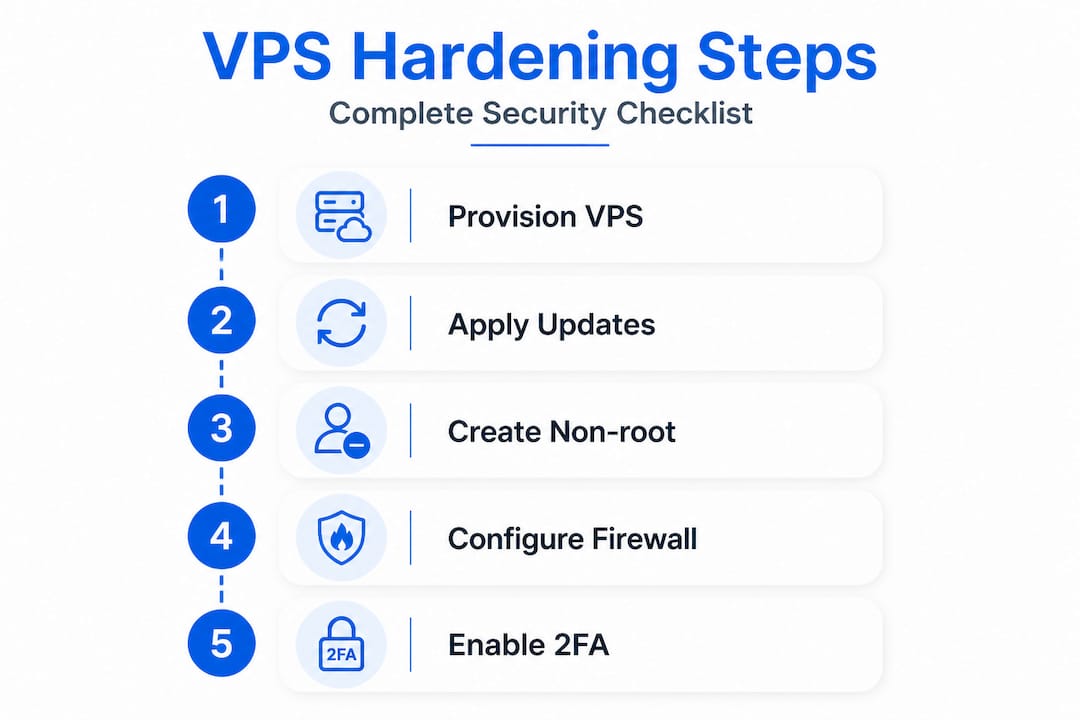
The core VPS setup methodology follows a clear sequence: provision the VPS, update the system with "apt update && apt upgrade`, create a non-root user with sudo privileges, configure SSH keys only and disable root login, change the default SSH port (port 2222 is a common alternative), set up UFW firewall rules to deny all incoming traffic by default and allow only SSH, port 80, and port 443, rate-limit SSH connections, install Fail2Ban for brute-force protection, and enable automatic security updates.

| Prerequisite | Why it matters | Tool or method |
|---|---|---|
| SSH key pair | Eliminates password-based attacks | ssh-keygen on local machine |
| Non-root user | Limits blast radius of any breach | adduser + sudo group |
| 2FA app | Second layer against stolen credentials | Google Authenticator |
| Firewall rules documented | Prevents accidental over-permissioning | UFW or NSG rules list |
| Console access confirmed | Recovery path if SSH breaks | Provider web console |
When preparing your Windows VPS, the same logic applies even if the tooling differs. Windows uses Remote Desktop Protocol instead of SSH, but the principles of least privilege, restricted access by IP, and layered authentication are identical.
Pro Tip: Always test your full hardening procedure on a staging VPS before applying it to production. A single typo in a firewall rule can lock out every administrator simultaneously, and your business cannot afford that kind of downtime.
Step-by-step VPS setup and security hardening
With all prerequisites ready, it's time to begin the actual VPS setup and apply robust security measures.
Follow this sequence carefully. Skipping steps to save time is exactly how vulnerabilities get introduced.
- Provision the VPS through your provider's panel. Choose the appropriate OS image, select your Ireland or EU region, and attach your SSH public key during provisioning rather than after.
- Update all packages immediately before doing anything else. Run
apt update && apt upgrade -yon Debian-based systems. Unpatched packages are the most common entry point for automated attacks. - Create a non-root administrative user. Log in as root only to create this user, then switch to it for all subsequent work. Assign it to the sudo group.
- Configure SSH key authentication. Copy your public key to the new user's
~/.ssh/authorized_keysfile. Set file permissions to 600 on the key file and 700 on the.sshdirectory. - Disable root login and password authentication in
/etc/ssh/sshd_config. SetPermitRootLogin noandPasswordAuthentication no. Change the SSH port from 22 to a non-standard port like 2222. - Configure UFW firewall. Set the default policy to deny all incoming and allow all outgoing. Then explicitly allow your new SSH port, port 80, and port 443. Rate-limit SSH to mitigate brute-force attempts.
- Install and configure Fail2Ban. This tool monitors log files and automatically bans IPs that show signs of brute-force behavior. Configure it to watch SSH, and set ban times of at least one hour for repeated failures.
- Enable unattended security updates so critical patches apply automatically without requiring manual intervention every week.
Always keep a recovery method open during initial setup. Before you restart the SSH service with new settings, open a second terminal session and keep it connected. If the new configuration breaks access, you still have a live session to fix it.
The advanced hardening approach adds several important layers: kernel hardening through sysctl settings to disable IP forwarding unless you specifically need Docker networking, AIDE and auditd for intrusion detection and audit logging, AppArmor or SELinux for mandatory access control that restricts what each process can do even if it is compromised, and iptables rules to limit SYN flood attacks to 25 connections per second.
When hardening your VPS for Windows environments, the equivalent steps include disabling the built-in Administrator account, renaming it, enforcing Windows Defender Firewall rules, enabling Windows Event Log auditing, and applying Group Policy settings to restrict RDP access.
Pro Tip: Write your hardening steps as an automation script using Bash or Ansible. A repeatable, version-controlled script means every new VPS you provision gets the same baseline security without relying on human memory or manual checklists.
Configure secure remote access for enterprise apps
With your VPS now secure, the next step is to configure efficient and compliant remote access methods for your teams.
Remote access is where most Irish businesses make their biggest mistakes. Leaving RDP or SSH open to the entire internet is the equivalent of leaving your office door unlocked with a sign listing your alarm code. The secure remote access standard for enterprise VMs is clear: use SSH keys plus 2FA for Linux, RDP with Network Security Groups and Azure Bastion or Just-in-Time access for Windows, and route all connections through a VPN rather than exposing services directly to the public internet.
| Access method | Best for | Key security control |
|---|---|---|
| SSH with key + 2FA | Linux VPS admin access | Key auth, IP restriction, 2FA |
| RDP with NSG | Windows VPS, enterprise apps | NSG rules, Azure Bastion, JIT |
| WireGuard VPN | All remote access scenarios | Encrypted tunnel, peer auth |
| OpenVPN | Legacy compatibility needed | Certificate-based auth |
| Azure Bastion | Azure-hosted Windows VMs | No public IP required |
For Linux environments, restrict SSH access by IP in your UFW or NSG rules. Only your office IP range and approved administrator home IPs should ever reach the SSH port. Enable 2FA using libpam-google-authenticator and configure PAM to require it for every SSH session.
For Windows environments, never expose RDP on port 3389 to the public internet. Use Network Security Groups to whitelist specific IP addresses, and consider deploying Azure Bastion, which provides browser-based RDP and SSH access without requiring a public IP on the VM at all. Just-in-Time access goes further by only opening the required port for a defined time window when a specific administrator requests it.
VPN configuration adds a critical layer regardless of OS. WireGuard is the modern choice: it is fast, lightweight, and easier to audit than OpenVPN. Set up a WireGuard server on your VPS, issue individual peer configurations to each authorized user, and require VPN connection before any remote access setup to enterprise applications becomes possible. This means even if an attacker discovers your server's IP, they cannot reach any services without a valid VPN certificate.
Compliance and advanced hardening: Meeting ISO 27001 for Irish enterprises
After connecting your remote teams securely, ensure your setup continues to meet evolving compliance and security challenges.
Many Irish businesses assume that choosing an ISO 27001-certified provider means their own compliance obligations are handled. This is a costly misunderstanding. ISO 27001 in cloud environments follows a shared responsibility model: the provider holds certification for physical security, hypervisor management, and network infrastructure, but you remain fully responsible for OS configuration, access controls, data encryption at the application layer, and application security. The provider's certification does not transfer to your deployment.
Your compliance responsibilities include:
- OS hardening: Disable unnecessary services, remove unused packages, apply CIS Benchmark settings where applicable.
- Access control: Enforce least privilege across all user accounts. No shared credentials. Every user gets their own account with logged activity.
- Data encryption: Encrypt data at rest using BitLocker for Windows or LUKS for Linux. Enforce TLS 1.2 or higher for all data in transit.
- Audit logging: Enable auditd on Linux or Windows Event Log auditing. Ship logs to a centralized SIEM (Security Information and Event Management) system.
- Intrusion detection: Deploy AIDE to monitor file system integrity and alert on unauthorized changes.
- Policy enforcement: Use advanced hardening tools like Azure Policy for cloud environments to detect and remediate configuration drift automatically.
Compliance is a continuous process, not a one-time box-checking exercise. A VPS that was compliant at launch can drift out of compliance within weeks if no one is actively monitoring it.
Schedule monthly compliance reviews as a minimum. Quarterly is the standard for most ISO 27001 implementations. Document every change, every access grant, and every policy exception. Auditors want evidence of ongoing diligence, not just a clean starting configuration.
Why most VPS setups in Ireland fall short—and how to avoid common pitfalls
The prevailing wisdom in IT circles is to set up your server correctly once and then focus on other priorities. In practice, this "set and forget" mentality is responsible for the majority of security incidents we see affecting Irish businesses. Real security is not a state you achieve. It is a practice you maintain.
The most common failure pattern we observe is a strong initial setup followed by months of neglect. Firewall rules get added for a specific project and never removed. A contractor gets temporary access that becomes permanent by default. Security updates get paused during a busy period and never re-enabled. Each of these gaps is small on its own. Together, they create an attack surface that automated scanners find within hours.
Teams also underestimate the importance of logging and monitoring. A well-configured VPS that nobody is watching is only marginally better than a poorly configured one. Fail2Ban blocks individual brute-force attempts, but it does not tell you about slow-and-low credential stuffing attacks that stay under the rate limit. Centralized logging and regular log review catch what automated tools miss.
The uncomfortable truth is that compliance documentation and actual security posture often diverge over time. A policy that says "access is reviewed quarterly" only protects you if someone actually performs that review and acts on what they find. We recommend that IT managers treat real-world setup best practices as living documents, revisiting firewall rules, monitoring configurations, and access logs on a fixed quarterly schedule, with a named owner responsible for each area.
Pro Tip: Schedule a quarterly VPS security review as a recurring calendar event with a specific agenda: firewall rule audit, access log review, user account audit, and patch status check. Assign ownership to a specific person, not a team, so accountability is clear.
Get started with trusted VPS solutions today
The steps in this guide give you a solid framework, but executing them reliably across a growing business environment requires the right infrastructure underneath.

At ie.netcloud24.com, we provide enterprise VPS hosting built specifically for Irish businesses that need secure, compliant remote access to their critical applications. Our Windows Server environments come pre-configured with RDS licensing, NVMe enterprise storage, built-in firewall protection, and VPN access, all ready within five minutes. Whether your team relies on Sage, Xero, or a custom ERP system, we handle the infrastructure complexity so your IT team can focus on business priorities. Reach out today to discuss a setup tailored to your compliance requirements and user count.
Frequently asked questions
What should I look for in a VPS provider for Irish businesses?
Choose a provider with Ireland-based or EU data centers, enterprise-grade security features such as encrypted storage and firewall controls, and infrastructure that supports enterprise compliance standards for optimal legal and operational assurance.
How can I secure remote access to my VPS?
Use SSH key authentication combined with two-factor authentication for Linux environments, RDP restricted by network security controls for Windows, and always route connections through a VPN for secure access rather than exposing services directly to the internet.
Does VPS provider ISO 27001 certification fully cover my compliance?
No. The provider's certification covers their physical and network infrastructure, but you remain responsible for your own OS configuration, access controls, and data security under the shared responsibility model.
What ongoing maintenance should I schedule on my VPS?
Regularly update the OS, review firewall rules, check access logs, and audit user permissions at least quarterly, using tools like AIDE and auditd to detect unauthorized changes between scheduled reviews.