
Your VPS was fine last quarter. Now traffic doubled, your dev team grew, and remote workers are complaining about slowdowns. The gap between "this works" and "this scales" is where most IT managers and small business owners get stuck. A truly scalable VPS workflow does not just survive growth. It absorbs it without you pulling an all-nighter to add RAM and hope for the best. This guide covers the tools, setup steps, common failure points, and optimization strategies you need to build a workflow that holds up under real pressure.
Table of Contents
- Key takeaways
- Building a scalable VPS workflow: what you need first
- Step-by-step setup for queue-based VPS automation
- Common pitfalls when scaling VPS workflows
- Verifying and optimizing your workflow over time
- My honest take on VPS scaling after years in the field
- How Netcloud24 simplifies managed VPS scaling
- FAQ
Key takeaways
| Point | Details |
|---|---|
| Queue thinking beats brute force | Separating tasks into queues prevents overloads better than adding CPU or RAM alone. |
| Automation reduces manual overhead | Scripted lifecycle controls and scheduled jobs free IT teams from repetitive management tasks. |
| Horizontal scaling cuts failure risk | Running multiple workers isolates failures better than scaling one large instance vertically. |
| Monitoring is non-negotiable | Tracking queue wait times and worker utilization lets you catch bottlenecks before users do. |
| Cost control requires workflow design | Snapshot scheduling, stop/restart automation, and concurrency tuning all reduce unnecessary spend. |
Building a scalable VPS workflow: what you need first
Before you touch a single configuration file, you need a clear mental model of how VPS scaling actually works. There are two directions: vertical and horizontal. Vertical means you give one server more CPU, RAM, or storage. Horizontal means you spin up more instances and distribute work across them. Both have a place, but horizontal scaling with task queues handles high concurrency and failure isolation far better than pumping resources into a single machine.
The tools that make a scalable hosting workflow possible fall into three categories: orchestration, message brokering, and data persistence. For orchestration, a workflow manager like n8n gives you a visual interface for building automation chains. Redis acts as the message broker. PostgreSQL handles persistent state and job data. Together, these three form the backbone of any serious VPS automation solution.
| Tool | Role in scalable workflow | When to use it |
|---|---|---|
| Redis | Message broker for task queues | Any horizontal scaling setup |
| PostgreSQL | Persistent job state and logs | Production environments |
| n8n (queue mode) | Workflow orchestration across workers | 1,000+ daily workflow executions |
| Provider API (e.g., Vultr) | Programmatic VPS lifecycle control | Automated provisioning and teardown |
| PHP/SQLite panel | Lightweight fleet management UI | Small to mid-size VPS fleets |
On the hardware side, match your server sizing to your actual workload type before scaling out. An I/O-heavy workload (file transfers, API calls, database reads) benefits more from network throughput and SSD speed than raw CPU cores. A CPU-intensive workload (data processing, image rendering) needs the opposite. Getting this wrong means spending money on resources that sit idle.

Pro Tip: Before adding workers, profile one week of your current VPS load. Identify whether CPU, memory, or I/O is the consistent bottleneck. This single step prevents 80% of misdirected scaling decisions.
Step-by-step setup for queue-based VPS automation
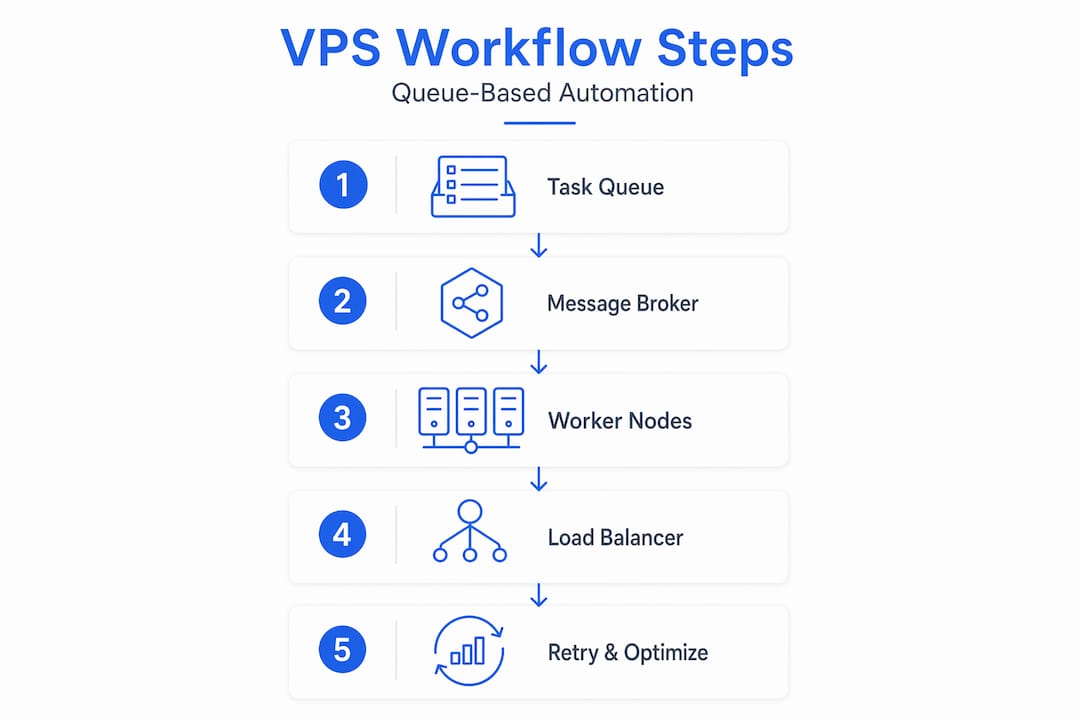
Once your tools are in place, here is how to build the actual workflow layer. These steps assume you are using n8n in queue mode with Redis as your broker, but the pattern applies to any queue-based VPS automation solution.
- Deploy your main instance. This node hosts the n8n UI and API. It does not execute workflows. It receives them, logs them, and hands them off.
- Set up Redis. Redis holds your task queue. Every new workflow execution drops into the queue as a job. Workers pull from it. n8n queue mode separates these two roles cleanly, so your UI stays responsive even when workers are saturated.
- Launch worker instances. Each worker connects to the same Redis instance and pulls jobs from the queue. For most operations running between 1,000 and 10,000 daily executions, two to three workers are enough. Beyond 10,000, you need auto-scaling logic.
- Configure PostgreSQL. Workers write execution logs and results to PostgreSQL. This keeps your state consistent across all nodes and prevents data loss if a worker crashes mid-job.
- Connect your provider API. Use the Vultr API or your provider's equivalent to script VPS lifecycle events: start, stop, restart, snapshot, and delete. Programmatic VPS control via API lets you trigger these operations from within workflows without touching a dashboard.
- Set concurrency limits per worker. For I/O-bound workflows, a concurrency of 10 to 20 per worker is reasonable. For CPU-heavy jobs, drop it to 3 to 5. Optimal concurrency depends entirely on workload type, not on what looks impressive in a config file.
- Add cron-based automation. Schedule nightly snapshots, off-hours power-down for non-critical instances, and weekly backup verification. These jobs run as workflow nodes, not separate scripts, which keeps everything auditable and centralized.
For high-availability requirements, you can deploy a multi-main setup: multiple main instances behind a load balancer, all sharing the same Redis and PostgreSQL backend. This eliminates a single point of failure at the orchestration layer, which matters when your VPS fleet supports critical business applications.
Pro Tip: Set a max retry count of three for any queued job and route failed jobs to a dead-letter queue rather than silently dropping them. This gives you a clean audit trail without losing visibility into what broke and when.
Common pitfalls when scaling VPS workflows
Most VPS scaling mistakes trace back to one root cause: treating the problem like a hardware problem when it is really a workflow design problem. Adding more RAM to a monolithic server that is not queue-aware just gives you a bigger bottleneck.
Here are the failure patterns that show up repeatedly:
- Vertical-only scaling. When a single server handles all execution, one runaway job blocks everything behind it. Queue isolation prevents this entirely.
- Ignoring API rate limits. When you manage multiple VPS instances via API, hammering requests in a tight loop gets you throttled. Batch your API calls with a 500ms delay between operations and limit concurrent requests to around 20. This keeps you inside provider limits without sacrificing speed.
- No queue monitoring. If you are not watching queue wait times, you will not notice when a worker dies. Jobs just pile up silently. Add alerts on queue depth and worker heartbeat.
- Misconfigured concurrency. Setting concurrency too high on CPU-bound jobs starves the system. Every job competes for the same cores and performance degrades non-linearly.
- Missing snapshots before changes. Deploying a config change directly to a live VPS without a snapshot is a recoverable mistake that becomes unrecoverable the moment something goes wrong.
Warning: Stopping a VPS instance in most cloud environments continues billing unless you explicitly delete the instance. And deleting without a prior snapshot means permanent data loss. Always snapshot before any lifecycle change, and verify your backup and snapshot schedule covers every production instance.
Debugging a stuck workflow is usually a Redis or concurrency issue. Check whether the worker is connected and pulling jobs. Check whether the job is stuck in "waiting" state (Redis lag) or "running" state (execution hang). Most slow-workflow complaints resolve at the Redis configuration layer, not the application layer.
Verifying and optimizing your workflow over time
Getting a scalable VPS workflow running is step one. Keeping it running efficiently as demands change is the ongoing work.
Start with your monitoring baseline. Track three metrics daily: queue depth, worker CPU utilization, and average job wait time. If queue depth trends up while worker CPU stays low, you have a concurrency configuration problem. If CPU is maxed and queue depth is also rising, you need another worker.
Auto-scaling is the answer for unpredictable workloads. Kubernetes Horizontal Pod Autoscalers can read Redis queue length as a custom metric and scale n8n workers between two and ten replicas automatically. This keeps costs aligned with actual demand rather than peak-capacity provisioning.
| Strategy | Cost impact | Performance impact | Best for |
|---|---|---|---|
| Vertical scaling | High per-tier cost | Moderate improvement | Simple, low-concurrency workloads |
| Horizontal scaling | Pay per active worker | High for concurrent jobs | High-volume, distributed workflows |
| Auto-scaling | Lowest over time | Matches demand precisely | Variable or unpredictable loads |
| Scheduled shutdown | Immediate savings | No impact on off-hours | Dev/test environments |
For fleet-level management, lightweight PHP/SQLite panels can handle bulk power operations, scheduling, and caching without the overhead of a full infrastructure platform. This is practical for IT teams managing 10 to 100 VPS instances who want more control than a provider dashboard but less complexity than a full Kubernetes deployment.
Cost control also comes from the workflow layer itself. Automate snapshot cleanup to avoid paying for outdated images. Schedule non-critical instances to shut down after business hours. Audit your workflow execution logs monthly and remove jobs that no longer serve a purpose. Advanced VPS platforms can automate up to 80 to 90 percent of these routine lifecycle tasks without requiring deep DevOps expertise.
Pro Tip: For I/O-bound workflows, increasing worker concurrency gives you more throughput per instance. For CPU-heavy jobs, reduce concurrency and add workers instead. Mixing these two workload types on the same worker will always underperform running them separately.
My honest take on VPS scaling after years in the field
I have watched teams throw money at VPS upgrades that did nothing because the problem was never the hardware. It was always the workflow design. In my experience, the moment you stop thinking about "more power" and start thinking about "better queues," everything gets cleaner. Your costs drop. Your reliability improves. Your monitoring actually tells you something useful.
The uncomfortable truth is that most VPS scaling attempts fail because nobody builds in automation from the start. People add scripts reactively, patch things together, and end up with a fleet that nobody fully understands. What I have found actually works is designing the automation layer first, before you scale at all. Treat your workflow definitions as code, version-control them, and monitor them with the same seriousness you give your application.
For IT managers and small business owners, the practical takeaway is this: you do not need a 20-person DevOps team to build a reliable, scalable VPS environment. You need the right tools, clear queue design, and a monitoring setup that tells you when something breaks before your users do. Start small, automate deliberately, and add workers only when the data tells you to.
— Lukasz
How Netcloud24 simplifies managed VPS scaling
For IT managers who would rather focus on their core business than manage Redis configurations at midnight, Netcloud24 offers a faster path to a production-ready, scalable VPS environment.

Netcloud24's Windows VPS hosting comes pre-configured with RDS licensing, NVMe enterprise storage, and high-availability infrastructure that is ready in under five minutes. Remote Desktop Services access means your team connects securely from anywhere, without you building the access layer from scratch. Automatic backups, firewall protection, and GDPR-compliant data handling are built in. If you are running Sage, Xero, or any ERP application on your VPS for remote work, Netcloud24 gives you the infrastructure that scales with your workflow rather than forcing your workflow to work around your infrastructure.
FAQ
What is a scalable VPS workflow?
A scalable VPS workflow is a structured system of automation, queue management, and resource controls that lets your VPS environment grow with demand without requiring manual intervention for every change in load.
How many workers do I need for queue-based VPS automation?
For most environments running between 1,000 and 10,000 daily workflow executions, two to three workers are sufficient. Above 10,000 daily executions, auto-scaling based on Redis queue depth becomes necessary.
What is the difference between vertical and horizontal VPS scaling?
Vertical scaling adds CPU or RAM to a single server, while horizontal scaling adds more instances running in parallel. Horizontal scaling with task queues handles high concurrency and isolates failures better, though vertical scaling is simpler to implement for low-volume workloads.
How do I prevent data loss when scaling VPS instances programmatically?
Always take a snapshot before stopping, restarting, or deleting any VPS instance. Snapshots and backups serve different purposes: snapshots capture fast state images for quick recovery, while full backups store all data for long-term protection. Use both.
How can I control costs in a scalable VPS hosting workflow?
Automate shutdown schedules for non-critical instances, audit and clean up outdated snapshots regularly, and use auto-scaling so you only pay for active workers. Matching worker concurrency to actual workload type also prevents over-provisioning on resources that sit underutilized.