
Remote desktop access has a reputation problem. Many IT managers assume that enabling it means punching holes in the firewall and hoping for the best. That assumption is wrong, and acting on it leads to either unnecessary risk or unnecessarily locked-down systems that frustrate remote workers. A Virtual Private Server (VPS) changes the entire dynamic by giving Irish businesses a centralized, tightly controlled environment for accessing ERP systems, accounting software, and other critical tools, without exposing internal networks to the open internet.
Table of Contents
- What is a VPS for remote desktop?
- Why security matters: VPS vs exposed desktops
- Operational efficiency: Managing and scaling access
- Performance, benchmarks, and practical limits
- A smarter path for Irish IT leaders: Why the conventional remote desktop playbook is outdated
- Next steps: Secure your enterprise remote desktop with the right Irish VPS solution
- Frequently asked questions
Key Takeaways
| Point | Details |
|---|---|
| Centralized security | VPS makes patching and access control for remote desktops easier and safer than traditional methods. |
| Reduced attack surface | Using RD Gateway with VPS prevents common exploits by wrapping RDP in encrypted HTTPS and enabling advanced policies. |
| Operational simplicity | One managed VPS means smoother updates and less complexity for IT teams supporting business-critical apps. |
| Performance realities | VPS-hosted RDP performance depends on provider, specs, and location, so test before you trust vendor claims. |
What is a VPS for remote desktop?
To understand the security and efficiency benefits, it's essential to clarify what a VPS actually provides in this setting.
A Virtual Private Server is a dedicated virtual machine hosted in the cloud, running its own operating system with its own allocated CPU, RAM, and storage. Unlike shared hosting, a VPS gives you isolated resources and full administrative control. In the remote desktop context, the VPS acts as the destination machine rather than the employee's local laptop or a physical office server.
Think of it as a shared workstation in the cloud that your team connects to remotely. The actual applications, whether that's Sage, Xero, or a full ERP platform, run on the VPS. Your staff use Remote Desktop Protocol (RDP) to see and interact with that environment from wherever they happen to be. The Remote Desktop Services overview from Microsoft confirms that a VPS can serve as a centralized, dedicated remote desktop target, making it significantly easier to patch, harden, and monitor a single controlled environment rather than tracking dozens of employee endpoints.
This approach also simplifies management dramatically. You patch one environment instead of thirty laptops. You configure security policies once instead of chasing down individual machines. For IT managers responsible for VPS for remote work performance across distributed teams, this single-hub model is a game changer.
| Feature | Traditional endpoint RDP | VPS-based remote desktop |
|---|---|---|
| Patch management | Per device, inconsistent | Centralized, consistent |
| Security hardening | Varies by machine | Applied once, enforced everywhere |
| Monitoring visibility | Fragmented across endpoints | Single point of audit |
| Application control | User-dependent | Admin-controlled |
| Scalability | Manual, slow | Rapid resource adjustment |
Irish businesses choosing VPS for ERP and accounting access typically point to several practical reasons:
- Consistent software versions across all users, eliminating the "it works on my machine" problem.
- Centralized data storage, so sensitive financial records never leave the secure server environment.
- Simplified GDPR compliance, since data residency and access logs are managed in one place.
- Lower endpoint requirements, meaning staff can connect from older hardware without performance issues.
- RDS (Remote Desktop Services) licensing, which allows multiple concurrent user sessions on a single server.
Building on a secure and scalable VPS from the start also means you avoid costly architectural rework later when your team grows.
Why security matters: VPS vs exposed desktops
Defining the VPS "hub" paves the way to examine why security is so much stronger with this approach.
The most common remote desktop setup in smaller Irish businesses is also the most dangerous: RDP exposed directly on port 3389, protected only by a username and password. This is not a theoretical risk. Automated bots continuously scan the internet for open RDP ports, and once they find one, brute-force attacks begin within minutes. Stolen or weak credentials are all it takes.
Centralizing access through a VPS already reduces the attack surface because your internal systems are not directly exposed. But the real security leap comes from pairing a VPS with an RD Gateway (Remote Desktop Gateway). According to Microsoft's RDS overview, RD Gateway encapsulates RDP traffic inside HTTPS (TCP port 443), allowing encrypted remote desktop connections from external networks without opening internal RDP ports at all. It also supports multi-factor authentication (MFA) and conditional access policies, which block credential-stuffing attacks that would walk straight through a plain RDP setup.
"Protocol choice alone is not enough. The organizations that suffer breaches through remote access are almost never defeated by an attacker breaking the encryption. They are defeated by weak credentials, unpatched systems, and overly permissive access rules. Secure remote desktop is an operational discipline, not a single technical setting."
That perspective holds up when you examine real vulnerability data. Even RD Gateway infrastructure can carry its own risks; CVE-2025-21225 is one example of an RD Gateway denial-of-service vulnerability that underscores why patching and network restriction must accompany any architecture decision, not just the protocol choice.
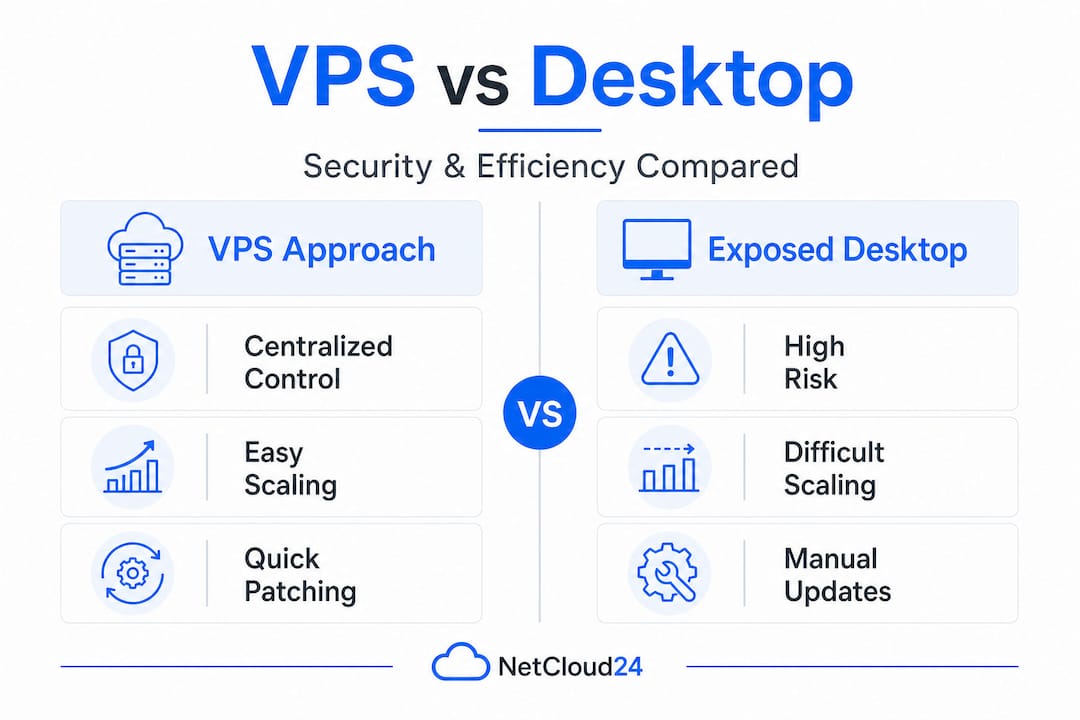
| Security factor | Exposed desktop (port 3389 open) | VPS with RD Gateway |
|---|---|---|
| Attack surface | High, directly internet-facing | Low, internal ports not exposed |
| MFA support | Optional, rarely configured | Built-in via RD Gateway |
| Monitoring | Limited, per endpoint | Centralized session logging |
| Patch management | User-dependent | Admin-controlled, scheduled |
| Brute-force resistance | Minimal without lockout policies | Conditional access enforces policy |
Pro Tip: Never treat RD Gateway as your only control. Layer it with IP allowlisting, network-level authentication (NLA), and automated account lockout policies. Reviewing the secure hosting checklist before you go live saves you from discovering gaps during an incident.
For Irish businesses running payroll software, accounting platforms, or multi-site ERP systems, these controls are not optional extras. They are the baseline expectation for any professionally managed remote access solution. The secure VPS setup process should be documented and auditable, especially where GDPR-sensitive data is involved.
Operational efficiency: Managing and scaling access
Security is one half of the equation. Operational efficiency and scale are just as critical for modern Irish IT operations.
When remote desktop access is fragmented across employee laptops or a mix of on-premise servers and personal devices, IT managers spend enormous time chasing consistency. One user is on an old version of Sage. Another's endpoint missed last month's Windows update. A third is using a personal laptop with no endpoint detection. These inconsistencies are not just inconvenient; they represent genuine compliance and security gaps.
A VPS-based remote desktop environment eliminates all of that. The RDS model means you are managing one controlled environment that all users connect to, ensuring every session runs on the same patched, hardened, and monitored platform. Here is how a typical patching and scaling workflow looks in practice:
- Schedule a maintenance window for off-peak hours, typically outside business hours for Irish-time operations.
- Take a snapshot of the current VPS state before applying any changes. This creates an instant rollback point if something goes wrong.
- Apply OS and application patches to the single VPS environment, testing with a staging snapshot where possible.
- Verify application functionality by running a quick test session on ERP or accounting tools before the maintenance window closes.
- Scale resources (CPU, RAM) through your cloud provider's control panel if usage data shows the current allocation is under strain.
- Document the change in your IT log for audit trail purposes, particularly relevant for GDPR and financial compliance reporting.
This process, when applied to a distributed endpoint model, would require running steps three and four on every single user device. With a VPS, it takes a fraction of the time and carries far less risk.
Pro Tip: Use VPS snapshots not just for patching rollbacks, but also before major software upgrades like moving to a new version of your ERP platform. A snapshot taken thirty minutes before the upgrade means a failed installation is a ten-minute recovery, not a multi-hour emergency.
Scaling is equally straightforward. As your team grows or as seasonal workloads spike, for example during year-end accounting, you adjust the VPS resource allocation rather than purchasing new hardware. This elasticity is a core advantage for Irish businesses focused on VPS for secure growth without overcommitting capital budgets.
Performance, benchmarks, and practical limits
With efficiency and control in place, it's necessary to ground expectations about real, measurable performance.
VPS remote desktop performance is not a single number. It varies based on provider infrastructure, data center location, the specs of your VPS instance, the number of concurrent users, and the nature of the applications being run. Published benchmarks from third-party reviews give you a starting point, but as LowEndReview's Windows VPS benchmark analysis points out, benchmark numbers vary widely by provider, region, and test methodology. Treat any headline figure as indicative rather than a guarantee for your specific ERP or accounting workloads.
Key performance callout: For most standard business tasks in accounting or ERP software, a well-configured VPS located in or near Ireland with NVMe storage and a reliable network should deliver sub-50ms latency for users in the country. This is well within the threshold for a responsive remote desktop experience. However, peak-hour congestion, underpowered instances, or shared infrastructure can push that figure much higher.
The factors that most influence your real-world experience include:
- Data center proximity. A VPS hosted in Dublin or a nearby European hub will consistently outperform one hosted in the US for Irish users, regardless of headline specs.
- Storage type. NVMe SSD storage dramatically reduces application load times compared to traditional SSD or HDD, particularly noticeable when opening large accounting files or ERP databases.
- RAM allocation. ERP systems are memory-hungry. Under-allocated RAM leads to disk swap usage, which kills performance even on fast storage.
- Concurrent user sessions. Each RDS session consumes CPU and RAM. Benchmark your VPS under realistic load, not just a single test session.
- Network quality. The provider's upstream bandwidth and peering arrangements affect consistency. A VPS that performs beautifully at 2am may degrade at 10am when dozens of other customers are active on the same infrastructure.
- Application type. Web-based ERP running inside a browser on the VPS behaves very differently from a thick client accounting application that renders locally.
The best practice here is straightforward: pilot your actual business-critical workloads before committing. Run Sage or your ERP platform on the VPS for a week with real users. Measure session responsiveness, application load times, and any disconnection issues. Headline benchmark numbers from unrelated test scenarios are not a substitute for this kind of real-world validation.
A smarter path for Irish IT leaders: Why the conventional remote desktop playbook is outdated
Having walked through the technical facts, it is worth challenging some standard industry thinking.
Most guides on remote desktop security focus heavily on protocol-level details. Disable SMBv1. Change the RDP port. Enable NLA. These are not bad recommendations, but they address the symptoms rather than the underlying architecture problem. The real risk for Irish businesses is not that RDP itself is insecure by nature. It is that distributed, unmanaged access points are inherently unauditable. You cannot enforce consistent policy across twenty laptops you do not control. You can enforce it perfectly across one VPS you do.
The conventional playbook treats each remote connection as an individual problem to be hardened. The smarter approach, one that aligns with how modern enterprise IT is designed, treats the entire remote access environment as a single managed asset. Moving to a centralized secure VPS does not just improve security for each connection. It changes the shape of your IT attack surface entirely.
Irish businesses that are still relying on direct RDP connections to office PCs or aging on-premise servers are carrying what amounts to security debt. Each unpatched endpoint, each user with local admin rights, each machine connecting from an unmanaged home network represents a risk that compounds over time. The question is not whether that debt will cost you. It is whether you recognize it before or after an incident.
Forward-thinking IT managers are already making this shift. The businesses that benefit most are those that stop thinking of VPS as an alternative to on-premise infrastructure and start thinking of it as the foundation their remote access strategy is built on. That shift in mindset, from edge defense to centralized control, is what separates a reactive security posture from a genuinely resilient one.
Next steps: Secure your enterprise remote desktop with the right Irish VPS solution
A VPS-based remote desktop strategy gives Irish IT teams something that no amount of endpoint hardening can replicate: a single, controlled environment for all business application access, built on enterprise-grade infrastructure and designed to scale with your business.

If you are ready to move beyond patchwork remote access and build a properly centralized, secure desktop environment for your ERP, accounting, or other critical tools, secure Windows VPS hosting at netcloud24 is built exactly for this use case. With RDS licensing included, NVMe storage, pre-configured Windows Server environments, and full GDPR compliance for Irish businesses, it is the professional choice for IT managers who need remote access done right. Deployment takes under five minutes. Security is built in from day one.
Frequently asked questions
How does a VPS improve remote desktop security for business apps?
A VPS creates a centralized remote desktop target that is far easier to patch, monitor, and harden than managing security across dozens of individual employee devices.
What is the role of RD Gateway when using VPS for remote desktop?
RD Gateway wraps RDP in HTTPS and enforces MFA and conditional access policies, eliminating the need to expose internal RDP ports to the internet.
Are VPS-based remote desktops fully immune to cyber threats?
No. Even VPS and RD Gateway environments carry patching-dependent vulnerabilities, which is why ongoing maintenance, access restriction, and monitoring remain essential parts of any secure remote access strategy.
Does VPS location affect remote desktop performance for Irish businesses?
Absolutely. Benchmark results vary by provider and region, so Irish businesses should always validate with real workloads and prioritize VPS providers with data centers in or near Ireland.