
Getting remote desktop access right inside an Irish enterprise is harder than it looks. You're balancing rapid deployment against strict security requirements, managing compliance obligations under GDPR, and trying to keep remote teams productive without opening dangerous gaps in your infrastructure. Every decision from how you route external connections to how you handle update rollouts carries real risk. This article gives you practical, proven tips you can act on right now, whether you're building a new remote desktop environment from scratch or hardening one that's already live.
Table of Contents
- Start with security first: Centralize and harden remote desktop access
- Build for compliance: Meet Irish and regulatory standards
- Accelerate deployment: Architect for speed and scale
- Layered security controls: Avoid common gaps and pitfalls
- Plan for edge cases: Update-related and operational risks
- Expert perspective: Why security is a continuous process, not a one-time fix
- Power your remote desktop infrastructure with secure Irish hosting
- Frequently asked questions
Key Takeaways
| Point | Details |
|---|---|
| Centralize and harden access | Anchor remote desktop around centralized datacenter/cloud, RD Gateway, TLS, and consistent MFA. |
| Enforce full regulatory compliance | Monitor session hosts and enforce standards using Defender, group policy, and a clear operations baseline. |
| Deploy at scale efficiently | Adopt a farm architecture and automate provisioning for fast, resilient enterprise rollouts. |
| Layer security everywhere | Require MFA and auditing for every RDP entry point and minimize privilege. |
| Plan for the unexpected | Anticipate update bugs and configuration drift—validate in staging and maintain a rollback plan. |
Start with security first: Centralize and harden remote desktop access
With the stakes clearly defined, you need a security-first posture before rolling out remote desktop access to any part of your organization.
The single most important architectural decision you can make is centralization. Rather than running applications on individual endpoints, move all processing to the datacenter or cloud and remote only the user interface to the device. This approach dramatically reduces your attack surface. As Microsoft's RDS overview explains, centralizing processing and remoting only the UI reduces endpoint management and patching overhead while strengthening your compliance and security posture, especially when combined with TLS, auditing, and MFA. When the application runs on a managed server rather than a distributed fleet of laptops, you control the environment entirely.
From there, the next layer is your connection protocol configuration. Never expose RDP directly on its default port to the internet. Instead, route all external sessions through an RD Gateway using HTTPS on TCP port 443 with properly issued TLS certificates. This keeps traffic encrypted and forces every connection through a controlled, audited entry point.
Certificates deserve special attention here. A properly configured certificate chain across all RDS components is your defense against man-in-the-middle attacks, where an attacker intercepts traffic between client and server. Without certificates, clients have no way to verify they're actually connecting to your server. Certificates validate your servers and ensure every connection is encrypted and trusted.
Core security hardening checklist:
- Enable RD Gateway with HTTPS and valid TLS certificates for all external connections
- Require multi-factor authentication (MFA) at every remote connection entry point
- Enable Network Level Authentication (NLA) on all session hosts to enforce authentication before any session is established
- Apply least-privilege access controls so users only access what their role requires
- Enable auditing and log every session connection, disconnection, and failed authentication attempt
- Use Group Policy to enforce idle session timeouts and screen lock policies
"The most dangerous assumption in remote desktop security is that your VPN handles everything. MFA, NLA, and certificate validation are independent requirements, not substitutes for each other."
Pro Tip: Run a VPS security checklist against your environment quarterly, not just at initial deployment. Configuration drift is real, and a setting that was correct at launch may have been changed during a troubleshooting session six months ago.
If you want to see how these practices map to scalable hosting options for Irish organizations, it's worth reviewing what pre-configured environments offer versus building from scratch, since a hardened baseline saves weeks of work. The remote work infrastructure landscape has evolved significantly, and many of the old assumptions about on-premises security no longer hold.
Build for compliance: Meet Irish and regulatory standards
After security, regulatory alignment is your next priority.
Irish businesses face a layered compliance landscape. GDPR is the obvious starting point, and it applies directly to how you handle user session data, audit logs, and any personal information processed through remote desktop environments. But depending on your sector, you may also need to satisfy ISO 27001 controls, financial services regulations, or health data requirements. Failing to account for these at the architecture stage means retrofitting compliance later, which is always more expensive and disruptive.
The practical approach is to treat compliance as an ongoing process rather than a setup task. Microsoft Defender for Cloud provides a compliance dashboard that maps your session host configuration against industry benchmarks, flagging deviations in real time. Combined with Group Policy and device management tools, you can enforce consistent configuration across every session host and generate audit evidence automatically.
Operational discipline matters as much as tooling. Regular patching and monitoring through a defined operations baseline prevents configuration drift and keeps your risk profile predictable. Without that baseline, you're essentially auditing an unknown environment every time you need to demonstrate compliance.
| Compliance area | Key controls | Tools to use |
|---|---|---|
| GDPR | Data minimization, audit logs, access controls | Group Policy, SIEM, session recording |
| ISO 27001 | Asset management, access control, incident response | Defender for Cloud, audit trails |
| Network security | Encrypted connections, segmentation | RD Gateway, TLS, firewall rules |
| Patch management | Regular updates, vulnerability scanning | WSUS, automated patching pipelines |
| User activity | Session logging, idle timeout enforcement | Event logs, Group Policy, RDS logs |
For a detailed walkthrough of configuration steps, a secure VPS setup guide tailored to enterprise access in Ireland covers the specific settings that matter most for GDPR-aligned deployments. And if you're looking for a broader framework, compliance best practices for Irish cloud hosting provide useful context for aligning your technical controls with legal obligations.
Accelerate deployment: Architect for speed and scale
Compliance controls only get you so far unless your deployment is designed to scale securely at speed.
The right architecture for enterprise RDS deployments is the farm model. Rather than running all roles on a single server, which creates both a single point of failure and a scaling bottleneck, you distribute responsibilities across dedicated role servers. According to a detailed RDS farm deployment guide, a properly architected farm includes a Connection Broker for session routing and load balancing, a Gateway for encrypted external access, Web Access for browser-based connections, and one or more Session Hosts where the actual applications run.
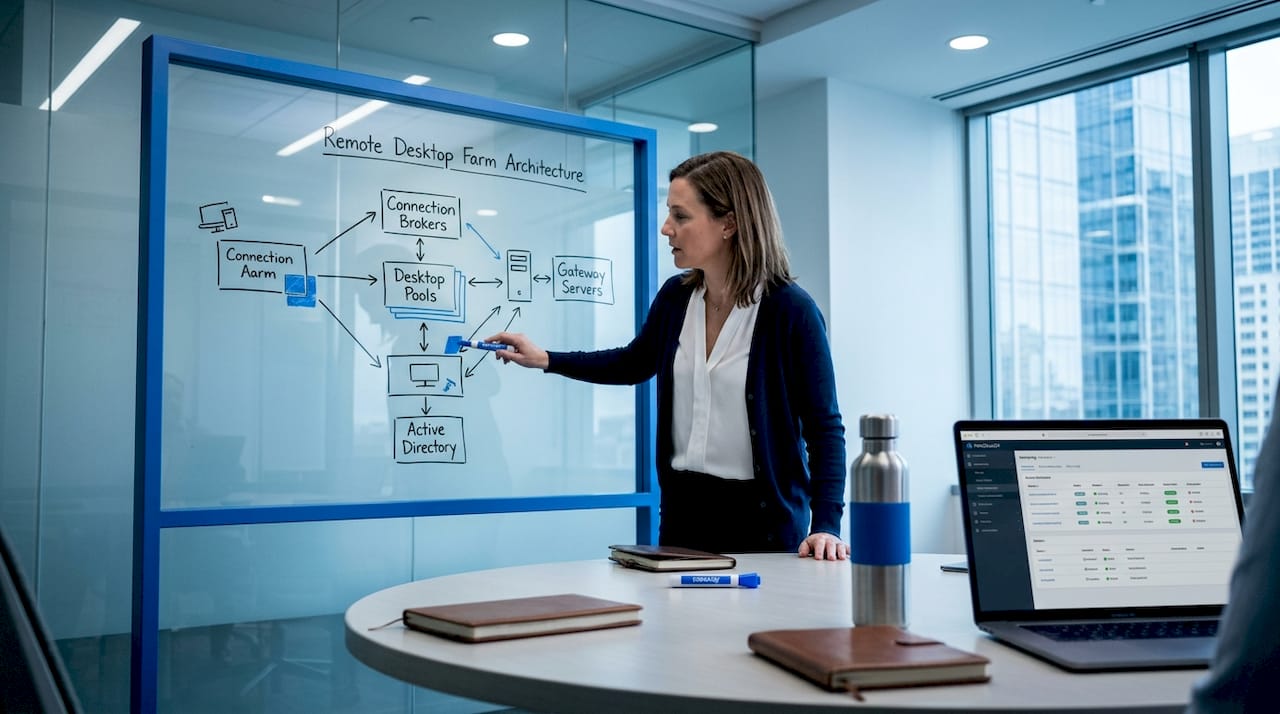
The same guide notes that for external access, you need a certificate for both the remote access server and the RDS Gateway, along with a DNS record pointing to your Web Access endpoint. Getting these dependencies mapped out before deployment avoids the most common cause of delayed go-lives: discovering mid-deployment that certificate procurement or DNS propagation is a blocker.
Recommended deployment sequence:
- Provision your infrastructure, whether cloud VPS or on-premises, with dedicated resources for each RDS role
- Install and configure the Connection Broker, establishing your high-availability configuration if you need it
- Deploy the RD Gateway with a valid TLS certificate and configure HTTPS access on port 443
- Set up RD Web Access and link it to the Connection Broker, then configure your DNS record
- Add Session Hosts and publish your applications through RemoteApp or full desktop collections
- Validate connectivity from external networks before any users migrate
Pro Tip: Use automation tools like PowerShell DSC or infrastructure-as-code templates for performance optimization of your session host configuration. Scripted provisioning means you can spin up additional capacity in under an hour when demand spikes, rather than manually configuring new servers under pressure.
| Deployment approach | Setup time | Scalability | Resilience |
|---|---|---|---|
| Single-server RDS | Under 2 hours | Limited | Low (SPOF) |
| RDS farm (manual) | 4 to 8 hours | High | High |
| Pre-configured VPS | Under 30 minutes | High | High |
| Automated farm deployment | 1 to 2 hours | Very high | Very high |
The pre-configured VPS option stands out for Irish businesses that need speed without sacrificing security. Environments that are ready to use within minutes, with RDS licensing already included, eliminate the most time-consuming parts of a greenfield deployment.
Layered security controls: Avoid common gaps and pitfalls
Even well-architected deployments can fail if you miss weak entry points or leave MFA inconsistent.
The most dangerous assumption is that securing one part of the access chain secures the whole thing. MFA at the VPN level, for example, does not protect direct RDP connections to session hosts that may be reachable through other network paths. Every RDP entry point including the Gateway, Web Access portal, and any direct RDP connections must enforce MFA. A gap at any single point undermines your entire access chain.
Common gaps that create serious exposure:
- MFA enforced on the VPN but not on RD Web Access or direct RDP connections
- Privileged accounts with overly broad session host access that should be scoped to specific applications
- Audit logs that are enabled but never reviewed, making them useless for incident response
- Service accounts with interactive logon rights left active from testing or initial setup
- Stale user accounts that remain active after employee departures because deprovisioning wasn't automated
Configuration drift is a particularly stubborn problem. A setting changed during a support call, a GPO exception added for a temporary workaround, or a firewall rule opened for testing and never closed, these accumulate over time. Regular security reviews against your baseline are the only reliable way to catch them before an auditor or attacker does.
For a practical framework on VPS hardening practices and why they drive business growth rather than just reducing risk, the principles apply directly to RDS environments. And if you're assessing your remote access readiness for a broader workforce rollout, the preparation principles translate well to infrastructure planning.
Plan for edge cases: Update-related and operational risks
Layered security and compliance steps don't remove operational edge cases. Be prepared for technical surprises too.
Updates are one of the most underappreciated sources of unplanned downtime in remote desktop environments. A Windows 11 update in April 2026 broke multi-monitor Remote Desktop functionality and required workarounds until Microsoft issued a fix. This wasn't an isolated incident. Update regressions affecting RDP features, including display scaling, keyboard shortcuts, clipboard redirection, and session reconnection, are a recurring pattern.
The mitigation is a staged rollout discipline. Test every OS and client update in a staging ring before touching production session hosts.
Operational resilience steps for update management:
- Maintain a staging environment that mirrors your production session host configuration as closely as possible
- Apply updates to staging at least 72 hours before any planned production rollout
- Document a rollback procedure and test it, don't assume you can roll back under pressure without having done it first
- Monitor vendor announcements and community forums for early warnings about RD-related regressions after major update releases
- After any update, explicitly test multi-monitor behavior, keyboard shortcut passthrough, clipboard redirection, and display scaling before clearing the update for production
"The organizations that recover fastest from update regressions are the ones that treated rollback as a first-class operational procedure, not an afterthought."
Operational risks extend beyond updates. Certificate expiration is another frequent cause of sudden access failures. A certificate expiring on a Saturday morning takes down every remote user simultaneously. Maintain a certificate renewal calendar with automated alerts at 60, 30, and 7 days before expiration. A simple reminder in your calendar system can prevent hours of emergency troubleshooting.
Expert perspective: Why security is a continuous process, not a one-time fix
Here's the uncomfortable reality that most remote desktop deployment guides skip over. The initial configuration, even when done correctly, is just a baseline. It will drift. Applications change, users request exceptions, administrators make emergency changes under pressure, and new vulnerabilities emerge that your original design didn't account for. Treating deployment as the finish line is how organizations end up with well-documented setups that are quietly insecure two years later.
The mindset shift required is from "secure at launch" to "maintain a known state." This means scheduling quarterly permission reviews, not waiting until an audit forces the issue. It means treating every GPO exception and firewall rule change as something that needs a ticket, a review, and an expiration date. It means running vulnerability scans against your own RDS infrastructure before attackers do.
Continuous monitoring is not optional for Irish enterprises with GDPR obligations. A data breach traced to a stale RDP configuration or an unreviewed service account is not just a technical failure. It's a regulatory failure with financial consequences.
Real IT resilience means planning for what can go wrong, not just what goes right. Zero-day vulnerabilities, update regressions, misconfigured certificates, and account provisioning gaps are all predictable categories of failure. Organizations that build explicit procedures for each of these scenarios recover in hours. Organizations that don't spend days in damage control. For a practical framework on maintaining operational compliance strategies over time, the principles of continuous alignment versus point-in-time compliance are worth internalizing before your next deployment.
Power your remote desktop infrastructure with secure Irish hosting
Ready to implement these best practices? The gap between knowing the right approach and having the infrastructure to execute it is where most Irish enterprises lose time.

At ie.netcloud24.com, we provide pre-configured Windows Server environments with RDS licensing included, NVMe enterprise storage, and security controls already in place, deployable in under five minutes. Whether you're migrating an existing team to a managed remote desktop environment or building out a multi-user setup for Sage, Xero, or custom ERP applications, our infrastructure is designed for Irish enterprise needs. GDPR compliance, VPN access, automatic backups, and technical support are built in, not bolted on. Explore our remote desktop hosting solutions and get your team connected securely without the setup overhead.
Frequently asked questions
Which security protocols are essential for remote desktop deployments?
TLS encryption, multi-factor authentication (MFA), and Network Level Authentication (NLA) are the three non-negotiable controls for enterprise remote desktop, as TLS and MFA hardening significantly strengthen your overall security posture.
How do I prevent man-in-the-middle attacks on RDS?
Deploy certificates across all RDS components to validate server authenticity and ensure every client connection is encrypted and trusted before session establishment.
What's the fastest way to deploy a scalable remote desktop environment?
Use an RDS farm architecture with separate roles for connection broker, gateway, web access, and session hosts, and automate provisioning with PowerShell or infrastructure-as-code templates.
How do I monitor ongoing compliance for Azure Virtual Desktop?
Defender for Cloud's compliance dashboard combined with Group Policy and device management tools gives you continuous visibility and automated enforcement across all session hosts.
What's a common pitfall during Windows updates for remote desktop?
Update regressions regularly break RDP features; the April 2026 Windows 11 update broke multi-monitor functionality, which is exactly why staging validation before production rollout is a mandatory step, not a nice-to-have.