
Understanding what is a Windows Server environment is where many IT professionals and business stakeholders trip up. This is not a beefier version of Windows 11. It is a purpose-built operating system platform designed to run centralized network services, host enterprise applications, manage identities across hundreds or thousands of users, and form the backbone of your organization's IT infrastructure. If your company runs Active Directory, hosts internal databases, or delivers remote desktops to staff, you are already operating inside a Windows Server environment. This guide covers every layer of that environment, from core roles to hybrid cloud integration, licensing, and real-world security challenges.
Table of Contents
- Key takeaways
- What is a Windows Server environment, really
- Core server roles and features
- Windows Server editions and licensing in 2026
- Security and patch management challenges
- Hybrid and cloud integration
- Building and managing a practical server environment
- My take on what most organizations get wrong
- Take your Windows Server environment further with Netcloud24
- FAQ
Key takeaways
| Point | Details |
|---|---|
| Not a desktop OS | Windows Server is built for centralized infrastructure management, not end-user computing. |
| Active Directory is foundational | Promoting a server to a domain controller creates the identity and policy engine for your entire network. |
| Edition choice drives cost | Standard and Datacenter editions differ primarily in virtualization rights, directly impacting licensing costs. |
| Security requires active management | Unlike consumer Windows, server updates require manual admin intervention and carry wormable exploit risks. |
| Hybrid is the new normal | Modern Windows Server environments extend into Azure and Microsoft Entra ID for identity synchronization and cloud workloads. |
What is a Windows Server environment, really
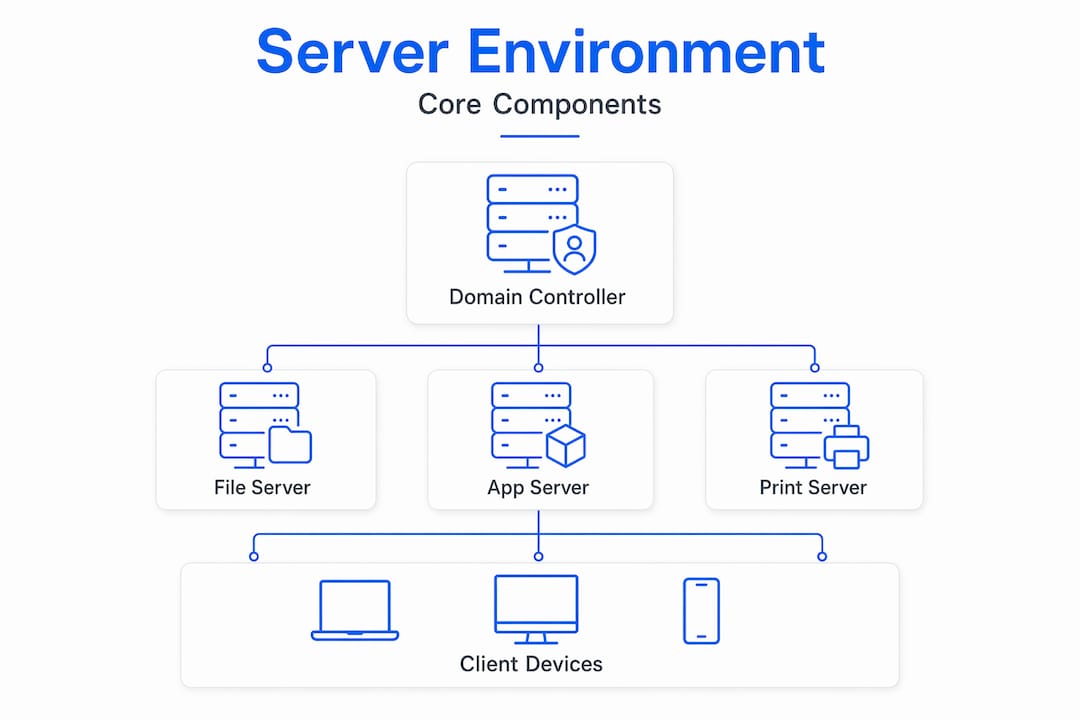
Most people outside enterprise IT picture a server as a big, loud box in a closet running a souped-up version of desktop Windows. That picture is wrong in almost every meaningful way. A Windows Server environment is a collection of server roles, services, policies, and network resources that work together to deliver centralized IT capabilities to an organization.
At its core, Active Directory transforms a Windows Server machine into a domain controller, making it the authoritative source for who can log in, what they can access, and what policies apply to every device on the network. That single function alone makes Windows Server indispensable to thousands of organizations worldwide.
The environment is not just one server. It is typically a layered architecture of physical or virtual machines, each assigned specific roles: authentication, file storage, DNS resolution, print services, web hosting, and more. Understanding Windows server means recognizing that the operating system itself is just the platform. The real value lives in how those roles are configured and managed together.
Core server roles and features
Windows Server ships with a library of installable roles that transform it from a blank OS install into a functional network resource. Understanding these roles is the foundation for any Windows Server overview.
The most critical roles include:
- Active Directory Domain Services (AD DS): The identity backbone. Every user login, group policy, and permission set flows through this role.
- DNS and DHCP: DNS resolves names to IP addresses across the domain; DHCP assigns IP addresses automatically to network clients.
- File and Print Services: Centralized file shares with permission controls, and managed access to shared printers.
- Remote Desktop Services (RDS): Allows multiple users to connect and work on the server simultaneously, critical for hosted application delivery.
- Hyper-V: Microsoft's built-in hypervisor, allowing you to run multiple virtual machines on a single physical host. This is what makes Windows Server the foundation of many private cloud setups.
- Web Server (IIS): Internet Information Services hosts web applications and APIs inside the enterprise or on public-facing servers.
Beyond roles, Windows Server features like Group Policy give administrators precise control over security settings, software deployment, and desktop configurations across every joined machine. PowerShell automation, through tools like the resource available at PowerShell workflow automation, turns repetitive admin tasks into repeatable scripts, saving hours weekly for any team managing more than a handful of servers.
Pro Tip: When planning your server roles, avoid stacking too many roles on a single physical server. Separating domain controllers from file servers and RDS hosts gives you cleaner maintenance windows and limits the blast radius of any single failure.
Windows Server editions and licensing in 2026
Choosing the wrong edition is one of the most expensive mistakes an organization can make. Microsoft structures Windows Server licensing around physical cores, not total servers.
Standard edition requires a minimum of 16 cores licensed per physical server and is designed for organizations running physical workloads or light virtualization. You get rights to run two virtual machines per licensed host. The Datacenter edition provides unrestricted virtual machine rights on each licensed host, plus the Hyper-V host itself, making it the clear choice for heavily virtualized data centers.
| Feature | Standard | Datacenter |
|---|---|---|
| Minimum core licensing | 16 cores per server | 16 cores per server |
| Virtual machine rights | 2 VMs per host | Unlimited VMs per host |
| Target use case | Physical or light virtualization | High-density virtualization and cloud |
| Storage Spaces Direct | No | Yes |
| Shielded VMs | No | Yes |
| Typical cost profile | Lower upfront | Higher upfront, lower per-VM cost |
For most small to mid-market businesses running a handful of virtual machines, Standard is the practical choice. For any organization running ten or more VMs per host, the per-VM math quickly makes Datacenter the more economical option.
Pro Tip: Always license to the actual physical core count of your server, rounding up to the nearest 8-core pack. Underlicensing is one of the most common audit findings in mid-market organizations.
Security and patch management challenges
The security posture of a Windows Server environment is only as strong as its least-patched domain controller. And that is not a theoretical concern.

IT administrators must treat domain controller patching as a top priority after every Patch Tuesday release. CVE-2026-41089, a wormable Netlogon buffer overflow vulnerability, allows unauthenticated remote code execution on domain controllers. A single unpatched DC in your environment gives an attacker the keys to your entire domain.
There is also the matter of how Windows Server handles updates compared to consumer Windows. Unlike your workstation, which can download and apply updates largely on autopilot, server updates require manual admin validation, particularly for changes as significant as Secure Boot certificate rotations. Applying these changes without testing can break enterprise infrastructure in ways that take days to diagnose.
Additional security risks worth keeping on your radar:
- BitLocker and legacy recovery environments: Recovery environment vulnerabilities in current Windows Server versions can expose BitLocker-protected volumes to physical attacks without requiring the encryption password.
- Missing Microsoft Store and tool gaps: Windows Server lacks default access to the Microsoft Store, meaning modern management utilities like Winget require manual sideloading. This creates gaps between your server and workstation tooling pipelines.
- Group Policy misconfigurations: Overly permissive policies are one of the top lateral movement enablers in ransomware incidents targeting Active Directory environments.
For a practical checklist on hardening your environment, the Windows Server security tips resource covers RDP hardening and compliance practices in depth.
Hybrid and cloud integration
The definition of what is a server environment has expanded significantly. A Windows Server deployment no longer stops at the edge of your building.
Modern Windows Server integrates deeply with Microsoft Azure and Microsoft Entra ID, enabling organizations to extend their on-premises identity and workloads into cloud services. Here is how that typically plays out in practice:
- Azure Arc: Lets you manage on-premises Windows Server instances through the Azure portal, applying policies and monitoring from a single plane regardless of where the server physically lives.
- Microsoft Entra ID Connect: Synchronizes your on-premises Active Directory with Microsoft Entra ID, enabling single sign-on for Microsoft 365, Azure services, and third-party SaaS applications.
- Azure Backup and Site Recovery: Extends your business continuity strategy by replicating server workloads to Azure without requiring a second physical data center.
- Windows Admin Center: A browser-based management tool that bridges local and cloud server management without requiring a full RDS or VPN connection for every admin task.
Administrators must balance traditional local server management with the shifting demands of hybrid cloud operations. The organizations that get this right treat their on-premises Windows Server environment as a foundation, not a silo. They use cloud services to extend capability where it makes sense while keeping sensitive workloads local where compliance or latency demands it.
Building and managing a practical server environment
You do not need a data center to learn or test Windows Server. A functional lab environment runs comfortably on a PC with 16 GB of RAM, using Hyper-V or another hypervisor to spin up domain controller and client VMs concurrently.
Practical advice for anyone setting up or managing a Windows Server environment:
- Promote deliberately. Promoting a server to a domain controller is a major step. Plan your domain name carefully before you begin. Renaming a domain post-promotion is painful and sometimes breaks dependent services.
- Use Server Core where possible. The minimal footprint of Server Core reduces the attack surface and memory overhead compared to the full desktop experience installation option.
- Remote administration is the norm. Learn to use Remote Server Administration Tools (RSAT) and Windows Admin Center early. Logging directly into your domain controllers for routine tasks is a security anti-pattern.
- Document your role dependencies. When you add DHCP, DNS, and AD DS to the same server in a small environment, you create a single point of failure. Document it explicitly so your team knows what breaks when that server goes down.
- Automate patching workflows. Windows Server Update Services (WSUS) or a third-party patch management platform is non-negotiable once you manage more than five servers. Manual patching at scale is how critical updates get missed.
For a step-by-step approach to remote desktop setup, particularly for RDS deployments serving multiple concurrent users, there is a dedicated guide covering the full configuration process.
Pro Tip: Take a snapshot of your domain controller VM before applying any cumulative update. It costs you ten minutes before the patch window and potentially saves your weekend if something goes wrong.
My take on what most organizations get wrong
I have watched organizations of every size build Windows Server environments, and the pattern that plays out most consistently is this: teams treat Active Directory as an IT utility and then act surprised when it becomes an IT emergency.
Active Directory is the identity and security engine of your enterprise network. It is not just a login service. It controls what every user and device can do, what software gets deployed, what network segments are reachable. When it is misconfigured or neglected, every downstream system suffers. I have seen a single stale admin account, forgotten after an employee departure, serve as the entry point for a full domain compromise.
The second thing I see consistently underestimated is the friction of hybrid cloud management. Moving to Azure Arc or Entra ID Connect sounds clean on paper. In practice, synchronization conflicts, conditional access policy gaps, and legacy application dependencies create months of remediation work that nobody budgeted for.
My honest advice for IT professionals approaching Windows Server environments today: treat your AD as a product, not a background service. Audit it quarterly. Automate your patching. And before you extend into hybrid cloud, read the dependency map of every application touching your on-premises Active Directory. The surprises are almost always buried there.
— Lukasz
Take your Windows Server environment further with Netcloud24
Building a well-configured Windows Server environment on-premises demands time, hardware, and specialist knowledge that many growing businesses simply cannot allocate internally.

Netcloud24 offers enterprise-grade Windows VPS hosting with Windows Server and RDS licensing already included, pre-configured and ready within five minutes of provisioning. Whether you need to host ERP systems, accounting tools like Sage or Xero, SQL databases, or IIS and ASP.NET applications, the platform provides NVMe storage, high availability, GDPR-compliant security, automatic backups, and VPN access from a single managed environment. For businesses in Ireland that need dependable remote access without the overhead of managing physical infrastructure, it is a practical path to a production-grade Windows Server setup without the usual lead time. Explore the scalable infrastructure guide to understand how hosted environments fit into a broader IT strategy.
FAQ
What is a Windows Server environment?
A Windows Server environment is a networked infrastructure built on Microsoft's Windows Server operating system, providing centralized services like user authentication, file storage, application hosting, and policy management across an organization.
How does Windows Server differ from desktop Windows?
Windows Server is purpose-built for multi-user, networked enterprise roles including Active Directory, RDS, and Hyper-V. Desktop Windows is designed for single-user computing and lacks these server roles and management features.
What are the main editions of Windows Server?
The two primary editions are Standard and Datacenter. Standard supports up to two virtual machines per licensed host, while Datacenter provides unlimited VM rights, making it better suited for highly virtualized environments.
Why is patching Windows Server domain controllers so critical?
Unpatched domain controllers are vulnerable to wormable exploits like CVE-2026-41089, which allows unauthenticated remote code execution. Because domain controllers govern the entire network identity layer, a single compromised DC can result in a full domain takeover.
Can Windows Server integrate with cloud services?
Yes. Windows Server integrates natively with Microsoft Azure and Microsoft Entra ID, enabling hybrid deployments that synchronize on-premises identities with cloud services, extend backup and recovery to Azure, and allow centralized management through tools like Azure Arc and Windows Admin Center.