
Many Irish IT managers assume that moving business applications to any cloud environment counts as a modern, secure solution. It doesn't. Generic or shared hosting introduces risks that are particularly dangerous for ERP systems, accounting platforms, and remote workforce tools, where data sensitivity and uptime requirements are non-negotiable. This guide breaks down exactly why dedicated Windows Server environments are the right infrastructure choice for enterprises that need real security, proven compliance, and rock-solid performance across their critical business applications.
Table of Contents
- The security case: Why isolation and control matter
- Built for business-critical apps: Compatibility and performance
- Operational control: Administration, user management, and remote access
- Enabling compliance, support, and growth for Irish businesses
- The real ROI of dedicated Windows Servers: Beyond the technical checklist
- Take the next step: Reliable Windows hosting for Irish enterprises
- Frequently asked questions
Key Takeaways
| Point | Details |
|---|---|
| Maximum security | Dedicated Windows Servers offer full isolation, policy control, and advanced hardening for business-critical data. |
| Native compatibility | ERP and accounting systems perform best and receive full support on dedicated Windows environments. |
| Remote admin control | Granular RDP workflows and admin access auditing empower secure and efficient IT management. |
| Compliance support | Dedicated servers simplify GDPR, data privacy, and vendor compliance for Irish enterprises. |
The security case: Why isolation and control matter
Generic cloud setups and shared hosting environments were not designed with enterprise security in mind. They prioritize cost efficiency and ease of provisioning, which means the trade-offs land squarely on you: limited administrative control, shared resources, and weaker isolation between tenants.
A dedicated Windows Server changes that equation entirely. When your server is yours alone, you control every layer of the environment. That includes Group Policy, Windows Firewall rules, user privilege assignments, and disk encryption through BitLocker. You're not waiting for a shared host to implement a security patch or hoping another tenant's compromised account doesn't affect your workload.
Here is what a dedicated Windows Server gives you that shared hosting simply cannot:
- Full administrative access to configure, audit, and enforce your own security policies
- BitLocker encryption at the volume level, protecting data at rest against physical or logical compromise
- Windows Security Baselines, a Microsoft-defined set of recommended configurations covering hundreds of individual settings, applied consistently across your environment
- Logical isolation from other tenants, eliminating the risk of lateral movement attacks that target shared infrastructure
- Custom Group Policy Objects (GPOs) that enforce login policies, screen lock timers, USB restrictions, and software whitelisting
The configure security baselines guidance from Microsoft makes clear that dedicated setups are the right environment for applying the full stack of Windows hardening controls. Without that isolation, many of those controls simply cannot be implemented at all.
"Isolation is not just a security feature. It is the foundation that makes every other security feature meaningful. Without it, controls are advisory at best."
Building secure enterprise access also means thinking carefully about where admin endpoints sit and how they are accessed. Using a dedicated jump server or privileged access workstation, separate from your general user environment, is a proven pattern for limiting exposure.
Pro Tip: Review the Windows VPS checklist before your next deployment. It covers the practical baseline settings that every enterprise environment should lock down before going live.

Now that you understand the unique challenges, let's see exactly how dedicated Windows servers solve these pain points.
Built for business-critical apps: Compatibility and performance
If your business runs Sage, a Microsoft Dynamics environment, or any SQL Server-backed ERP platform, your hosting infrastructure has to be fully compatible at the operating system level. This is where generic or Linux-based hosting falls apart fast.
Dedicated Windows Servers support the full Microsoft application stack without restrictions. That means SQL Server with all agent jobs and replication features intact, IIS for web-based application front ends, and the complete .NET Framework and .NET Core runtimes side by side. No blocked ports. No stripped-down feature sets. No surprises during deployment.
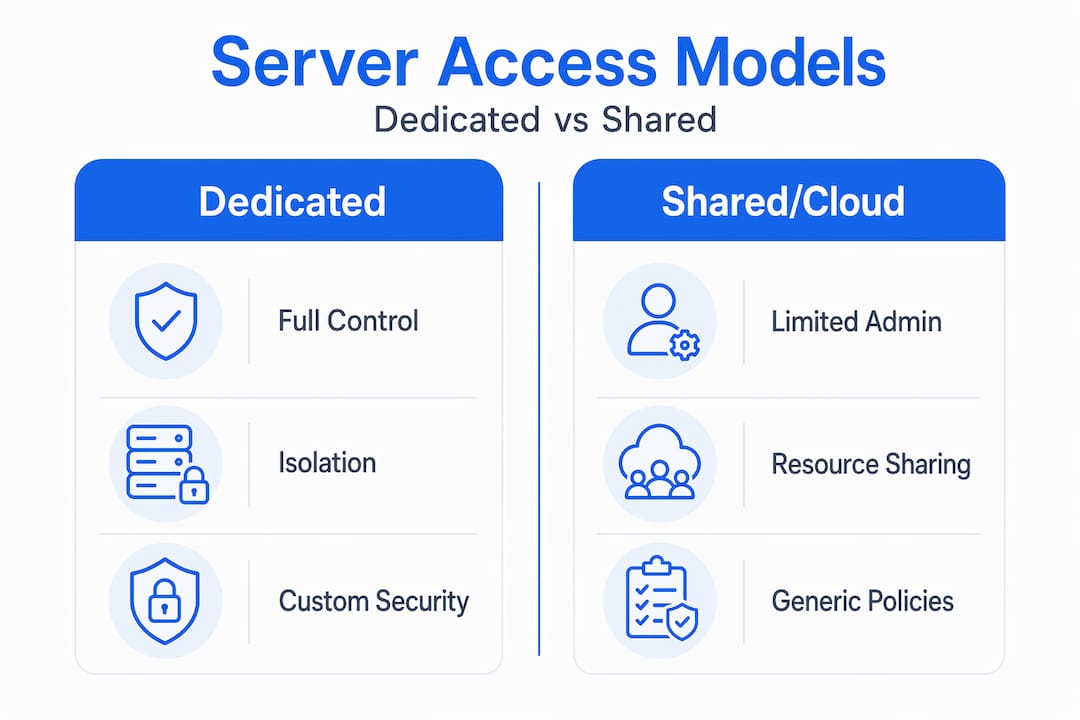
Here is a direct comparison to illustrate why this matters in practice:
| Feature | Dedicated Windows Server | Generic shared/cloud hosting |
|---|---|---|
| SQL Server full feature set | Yes, all editions supported | Often restricted or unavailable |
| IIS web server control | Full admin and configuration | Limited or locked |
| .NET Framework versions | Any version, side by side | Restricted to host defaults |
| RDP multi-user access | Configurable per application | Usually blocked or limited |
| Port management | Full firewall control | Restricted by provider policy |
| Windows security baselines | Fully enforceable | Not available |
| ERP vendor support eligibility | Yes | Often excluded |
The numbers back this up. Nearly all major Microsoft ERP vendors explicitly require or strongly recommend dedicated Windows Server environments for production deployments and vendor support eligibility. Running on an unsupported configuration means your vendor will not help you when things go wrong, and things always eventually go wrong.
Remote Desktop Protocol (RDP) performance is another area where dedicated environments pull ahead sharply. When a remote accountant in Cork or a sales manager in Galway connects to your ERP application, session quality depends on dedicated CPU and RAM allocation. On a shared environment, you are competing with other tenants for those resources during peak periods.
To check whether your business application needs a dedicated environment, follow these steps:
- Review your software vendor's system requirements and support policy documents
- Identify whether the application requires SQL Server, IIS, or specific .NET versions
- Check whether RDP or multi-user access is part of the intended deployment model
- Verify whether your application must pass security audits or compliance checks
- Confirm whether your current environment allows you to apply Windows Security Baselines
For a detailed look at ERP and accounting platform compatibility in hosted Windows environments, and to compare Windows VPS hosting options suited to different business sizes and app stacks, the resources are worth reviewing before you commit to an infrastructure path.
While security and compatibility are critical, robust administration plays a central role in successful deployments.
Operational control: Administration, user management, and remote access
For IT managers running remote teams or supporting multiple departments, the ability to granularly control who can access what, and prove it on demand, is not optional. It is a baseline operational requirement.
Dedicated Windows Servers give you that control through native Microsoft tooling. You can assign admin roles using Role-Based Access Control (RBAC), separate standard users from privileged accounts, and enforce account policies without negotiating with a hosting provider's shared control panel.
Here is how the operational control picture compares:
| Control area | Dedicated Windows Server | Shared cloud environment |
|---|---|---|
| Admin role assignment | Full RBAC, custom delegation | Limited to provider-defined roles |
| RDP session management | Full control, session limits, timeouts | Usually provider-managed |
| User auditing and login logs | Native Windows Event Log, full detail | Often partial or unavailable |
| Security baseline enforcement | Applied via GPO or OSConfig | Not available to tenant |
| Privileged access restriction | Configurable per user and role | Restricted to provider settings |
Audit controls on a dedicated Windows Server include:
- Login tracking: Every successful and failed login attempt logged to Windows Event Log
- Session logging: RDP session start, end, and duration records for compliance review
- Privilege escalation auditing: Alerts when a standard user account attempts to gain elevated rights
- Baseline drift detection: Automated comparison of current settings against your security baseline
- Software installation events: Full audit trail of what was installed, when, and by whom
Windows Security Baselines from Microsoft explicitly stress that security-sensitive environments should treat RDP and admin workflows as part of the threat model. That means isolating admin endpoints, limiting privileged role access, and using baselines to prevent configuration drift over time. None of this is practical in a shared environment.
Understanding how to strengthen remote desktop security is directly tied to the infrastructure layer underneath it. Similarly, remote work performance for distributed teams is far more predictable when the underlying server is dedicated rather than shared.
Next, we'll explore how these technical advantages translate into real compliance and business benefits.
Enabling compliance, support, and growth for Irish businesses
GDPR is not a checkbox exercise. For Irish businesses handling customer financial records, employee data, or healthcare information, data isolation and access controls are legal obligations. A dedicated Windows Server makes GDPR compliance significantly easier to achieve and demonstrate because you can document exactly who accessed what data, when, and from where.
Software vendors also make compliance a commercial issue. Many accounting and ERP vendors, including those widely used across Irish businesses, explicitly state in their support agreements that they will not assist with issues arising from deployments on unsupported or shared hosting environments. Moving to a dedicated server is often the difference between getting vendor support and being told you're on your own.
The three reasons Irish IT leaders most commonly cite when upgrading to a dedicated Windows environment are:
- Compliance: Meeting GDPR, ISO 27001, or sector-specific audit requirements that demand documented access controls and isolation
- Vendor support: Ensuring eligibility for software vendor assistance on ERP and accounting platforms where uptime is critical
- Scaling remote access: Supporting growing remote workforces without degrading application performance or security posture
For practical guidance on compliance and protection in the Irish context, and for a technical walkthrough of secure VPS setup before you go live, both resources address the specific pressures Irish enterprises face.
Pro Tip: If your applications do not require a graphical user interface for server management, deploy Windows Server Core edition. It strips out the desktop shell, reducing the attack surface by eliminating dozens of components that can be exploited. Microsoft's security hardening guidance identifies Server Core as a recommended pattern for security-conscious deployments.
The trajectory is clear. Remote work is not a temporary trend, and regulatory pressure on data handling in Ireland is increasing, not easing. A dedicated Windows Server is infrastructure that scales with both of those realities.
Having established the full case, let's clarify some common misconceptions and outline what really matters in practice.
The real ROI of dedicated Windows Servers: Beyond the technical checklist
Here is an uncomfortable truth that rarely appears in infrastructure procurement discussions: most IT teams that are underinvesting in their hosting environment do not realize the true cost until something goes wrong. And by then, the damage is already done in downtime, recovery labor, compliance penalties, or lost vendor support during a critical failure.
The real return on investment from a dedicated Windows Server is not measured primarily in uptime percentages or benchmark scores. It is measured in the incidents that never happen. When your environment is properly isolated, your baselines are enforced, and your audit logs are clean, the firefighting simply stops. That recovered time goes back to your team for actual work.
We see this pattern consistently. An IT team running a Sage or Dynamics environment on generic cloud infrastructure spends hours every quarter investigating anomalous behavior that a properly secured dedicated environment would have flagged and blocked automatically. The cost of that investigation, including the distraction, the escalation, and the potential for something to slip through unnoticed, dwarfs the cost difference between shared and dedicated hosting.
The most predictable IT spend is the one where problems don't happen. That sounds obvious, but it runs counter to how many procurement conversations are framed. The focus tends to land on monthly server costs rather than total operational cost including incident response, compliance audit preparation, and the hidden tax of unreliable performance on end-user productivity.
Choosing a dedicated Windows Server is not about over-engineering your infrastructure. It is about choosing an environment that removes friction from your daily operations and lets your team focus on supporting the business rather than managing preventable problems.
VPS hosting and business growth are directly connected when the infrastructure underneath your critical applications is stable, secure, and matched to your actual workload requirements.
Take the next step: Reliable Windows hosting for Irish enterprises
Your ERP, accounting platform, and remote workforce tools deserve infrastructure that was designed for them, not adapted from something built for a completely different use case.

At ie.netcloud24.com, we provide dedicated Windows VPS for enterprise environments built specifically for Irish businesses running mission-critical applications. Every environment includes RDS licensing for multi-user access, NVMe enterprise storage, pre-configured security baselines, and support for applications like Sage, Xero, and Microsoft Dynamics. Deployment takes under five minutes, and your team gets secure remote access without the compromises that come with generic hosting. If GDPR compliance, vendor support eligibility, and reliable performance for your remote workforce matter to your business, the right infrastructure is ready when you are.
Frequently asked questions
What key features make a dedicated Windows Server more secure than shared hosting?
Dedicated Windows Servers enable full admin control, isolated environments, and enforceable security baselines, making them far harder to compromise than shared setups where those controls are unavailable.
Do I need a dedicated server to ensure GDPR and compliance for business apps?
A dedicated Windows Server provides the isolation, access auditing, and baseline enforcement needed to document and demonstrate GDPR compliance in a way shared hosting cannot support.
Why do vendors require dedicated Windows servers for ERP and accounting systems?
Vendors require dedicated environments to guarantee native compatibility with SQL Server, IIS, and .NET runtimes, and to ensure full operational control that shared hosting structurally cannot deliver.
Can dedicated Windows servers help prevent RDP and admin credential attacks?
Yes. By isolating admin endpoints and enforcing strict security baselines, dedicated servers mitigate the most common RDP brute-force and privilege escalation attacks that target shared environments.