
Most businesses assume that keeping a database "in-house" is the only way to stay in control. That assumption is costing them time, money, and in some cases, their compliance standing. Understanding what is database hosting, and the real differences between your options, changes how you think about data infrastructure entirely. This guide breaks down the database hosting definition, the most common types, what managed services actually handle for you, and the factors that should drive your final decision whether you are running a five-person firm or an enterprise IT team.
Table of Contents
- Key takeaways
- What is database hosting and the main types
- Advantages of database hosting in the cloud
- What to consider in database hosting decisions
- How database hosting services actually work
- Choosing the right database hosting solution
- My take on database hosting strategy
- Why Netcloud24 fits your database hosting needs
- FAQ
Key takeaways
| Point | Details |
|---|---|
| Database hosting types matter | On-premises, cloud, and hybrid models each suit different workloads, compliance needs, and budgets. |
| Cloud shifts operational burden | Managed cloud hosting handles patching, backups, and scaling so your team focuses on development. |
| Compliance drives model selection | Regulatory requirements often override cost or performance when choosing a hosting approach. |
| Shared responsibility still applies | Even fully managed services require you to own schema design, user access, and application security. |
| Cost hides in the details | Total cost of ownership must account for egress fees, subscriptions, and hidden cloud expenses. |
What is database hosting and the main types
At its core, the database hosting definition describes the practice of storing, managing, and providing access to a database through either physical hardware you control or infrastructure managed by a third party. The database itself, whether relational like Microsoft SQL Server or MySQL, or document-based like MongoDB, lives on servers that need power, network connectivity, storage, and ongoing maintenance. Hosting determines who owns and manages those servers.
On-premises hosting
With on-premises hosting, your organization owns the hardware, maintains the servers, handles all software patching, and takes full responsibility for uptime and disaster recovery. You get direct control over every layer of the stack. That control comes at a cost. Capital expenditure for servers, storage arrays, networking equipment, and the IT staff to run it all adds up before a single query runs.
Cloud database hosting
Cloud database hosting offloads the infrastructure entirely to a provider. You access your database over a network, and the provider manages the physical servers, operating system updates, and often the database engine itself. This is what most people mean when they ask about what is database hosting in cloud contexts. The provider handles automated patching, capacity provisioning, and scalability. You pay for what you use.
Hybrid hosting
Hybrid models combine both approaches. Sensitive or regulated data stays on-premises while less critical workloads or development environments run in the cloud. Many enterprise organizations land here by default as they migrate incrementally rather than all at once.
| Hosting type | Control level | Cost structure | Scalability | Best for |
|---|---|---|---|---|
| On-premises | Full | High upfront CapEx | Limited by hardware | Regulated industries, stable workloads |
| Cloud (managed) | Partial | Pay-as-you-go | Dynamic, elastic | Variable workloads, fast-growing teams |
| Hybrid | Mixed | Mixed | Flexible | Enterprises with compliance and cloud needs |
Advantages of database hosting in the cloud
The advantages of database hosting, especially managed cloud options, go well beyond convenience. They change what your IT team can actually accomplish.
Scalability is the most immediate benefit. Cloud-based database hosting lets you scale resources dynamically without procuring new hardware or waiting weeks for a vendor to ship equipment. A retail business seeing a traffic spike during a sales event can increase database capacity in minutes and scale back down the same day.
Security and backup management are handled by the provider at a level most small and mid-sized IT teams cannot replicate internally. Key advantages include:
- Automated daily backups with point-in-time recovery options
- Encryption at rest and in transit as a default configuration
- Managed firewall rules and network isolation
- Regular security patches applied without manual intervention
- Built-in monitoring and alerting for unusual access patterns
High availability is another area where managed cloud hosting excels. Multi-zone replica configurations keep your database online even if an entire data center goes offline. AWS Aurora, for example, maintains six copies of your data across three availability zones simultaneously.
The operational shift matters too. Migrating to managed cloud hosting frees your developers and database administrators from routine maintenance, letting them spend time on work that actually moves the business forward. That is a genuine competitive advantage for growing companies.
Pro Tip: Before signing with any database hosting provider, request their SLA documentation and verify their security certifications. Look specifically for SOC 2 Type II reports, ISO 27001 certification, and uptime guarantees above 99.9%. An SLA without financial remedies for downtime is just a promise.
What to consider in database hosting decisions
Choosing the right model is not simply a matter of picking the cheapest or fastest option. Several factors should shape your decision, and getting them wrong creates problems that compound over time.
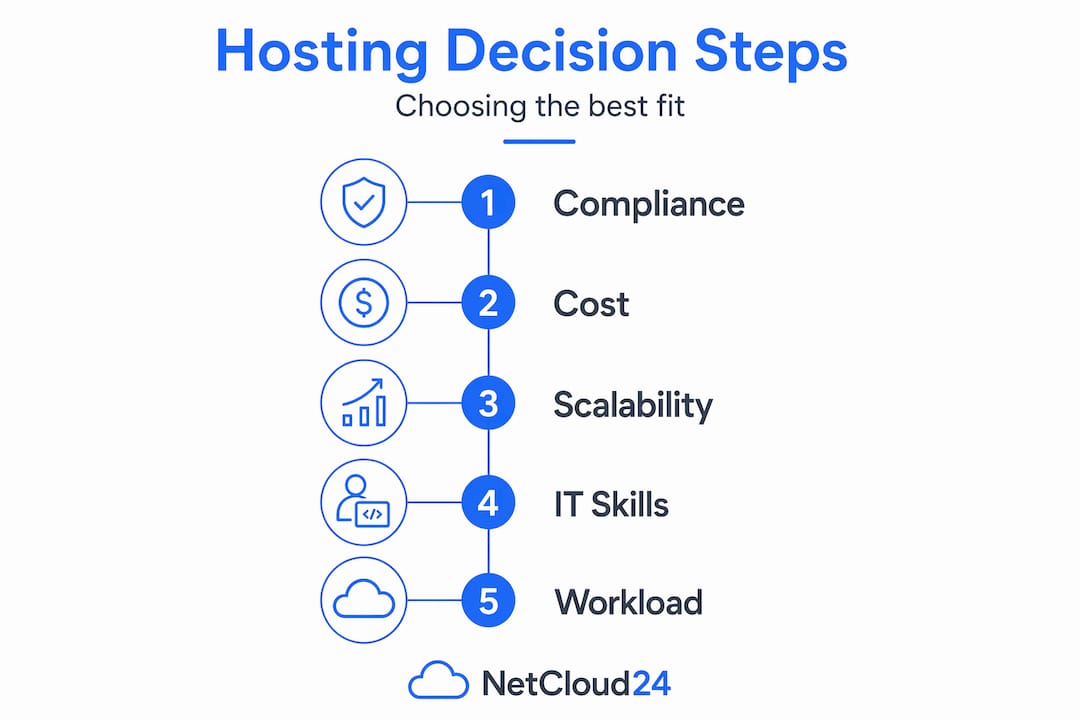
Regulatory compliance is the biggest non-negotiable for many industries. Compliance often mandates on-premises hosting for organizations in healthcare, finance, and legal services where data residency laws or frameworks like HIPAA and GDPR restrict where data can live and who can access it. For Irish businesses, GDPR compliance is a firm requirement, and your hosting provider's data center location matters significantly. Compliance-focused hosting decisions deserve as much attention as performance benchmarks.
Cost structure deserves a deeper look than most teams give it. For predictable, steady workloads, on-premises hosting can actually be more cost-effective than recurring cloud subscriptions. The calculation changes when you factor in hardware refresh cycles every three to five years, staffing, and facilities costs. Cloud pricing looks attractive monthly but the total cost of ownership must include data egress fees, which catch many organizations off guard.
Workload variability should guide your elasticity requirements. Businesses with predictable, flat database usage patterns get little value from elastic cloud pricing models. Organizations with seasonal spikes or unpredictable growth benefit significantly.
Control preferences reflect your team's maturity and your risk tolerance. Some IT teams need direct access to the underlying server configuration for troubleshooting or custom optimization. Others are better served by a managed service that removes that responsibility entirely.
Key factors to evaluate before making a decision:
- Current internal IT capabilities and database administration expertise
- Data sovereignty and residency requirements for your industry
- Projected workload growth over the next two to three years
- Recovery time objectives and recovery point objectives for business continuity
- Integration requirements with existing applications and on-site systems
Pro Tip: Before migrating any production database to a cloud host, audit your internal IT capabilities honestly. If your team has no experience with cloud-native database tooling, a lift-and-shift migration without training will create more problems than it solves.
How database hosting services actually work
Understanding how does database hosting work at a technical level helps you ask the right questions when evaluating providers and avoid surprises after deployment.

Managed cloud database services operate under a shared responsibility model. The provider manages everything below the database application layer: physical servers, networking, operating system, database engine patches, and availability infrastructure. You retain responsibility for everything above that line.
Automated backups are a standard feature of most Database-as-a-Service offerings. Managed services maintain transaction logs for up to 35 days, enabling granular point-in-time recovery. That means if a developer accidentally drops a table at 2:14 PM on a Tuesday, you can restore the database to 2:13 PM without losing days of work.
High availability mechanisms deserve particular attention. Most people understand that "high availability" means the database stays online, but the mechanism matters. Providers use multi-replica configurations across availability zones to keep reads and writes available even during hardware failures or maintenance windows.
| Feature | Provider responsibility | Client responsibility |
|---|---|---|
| Hardware and physical infrastructure | Yes | No |
| OS patching and security updates | Yes | No |
| Database engine version upgrades | Yes (managed) | No |
| Automated backups and PITR | Yes | Configuration decisions |
| Schema design and optimization | No | Yes |
| User access and permissions | No | Yes |
| Application-level security | No | Yes |
| Data encryption key management | Shared | Yes |
One point that catches organizations off guard: clients retain full responsibility for database-level security even with fully managed services. The provider secures the infrastructure. You must secure the database itself, including who has access, what they can do, and how your application connects.
Choosing the right database hosting solution
The best database hosting solutions for your organization depend on matching the service's capabilities to your specific operational profile, not just picking the most popular platform.
Start with a structured evaluation process:
- Define your requirements. Document your compliance obligations, uptime requirements, data volume, peak load patterns, and budget constraints before looking at any provider.
- Assess your internal capabilities. Determine whether your team can manage a self-hosted database or whether a fully managed service removes a burden you cannot reasonably staff for.
- Compare service tiers. Managed services like AWS Aurora, Azure SQL Database, and MongoDB Atlas each offer different performance profiles, pricing models, and geographic availability. Free tier options exist for smaller projects and prototyping, which lets you test before committing.
- Evaluate dedicated VPS options. For organizations that need more control than a managed DBaaS but do not want to run physical hardware, a Windows VPS with a licensed database engine offers a practical middle ground. This is particularly relevant for businesses running Microsoft SQL Server with existing application dependencies.
- Test integration with existing systems. Any new hosting platform must work with your current application stack, authentication systems, and monitoring tools before you commit to a migration.
- Plan the migration itself. A production database migration needs a tested rollback plan, a maintenance window, and thorough post-migration validation before decommissioning the old environment.
Professional VPS hosting fills a gap that pure managed DBaaS cannot always address, especially for businesses running ERP systems, accounting software, or custom applications that require a specific Windows Server environment with direct RDP access.
My take on database hosting strategy
I have seen organizations rush to cloud database hosting because it felt like the modern thing to do, and then spend eighteen months untangling a mess of egress costs, misconfigured access controls, and compliance gaps they did not know existed until an audit surfaced them.
The shared responsibility model is genuinely misunderstood. DBaaS shifts operational burden toward the provider, which is real and valuable. But I have watched teams interpret "managed service" as "someone else handles security." That interpretation is incorrect and dangerous. The provider secures the pipes. You must still secure the database itself.
My honest view is that not every organization should be on a fully managed cloud database service, at least not yet. If your workload is predictable, your compliance requirements are strict, and your IT team is already stretched thin without cloud expertise, a well-configured VPS with a licensed SQL engine often delivers better outcomes than a managed cloud database that requires skills you have not built yet.
The cloud agility benefits are real, but they require mature security governance to capture safely. Organizations that treat database hosting as a strategic infrastructure decision rather than a checkbox tend to build something that actually scales with them.
Think long-term. The cost of migrating again in two years because you chose wrong the first time is far higher than taking an extra month to evaluate properly now.
— Lukasz
Why Netcloud24 fits your database hosting needs
If you have been through the considerations above and landed somewhere between "I need more control than a managed DBaaS" and "I cannot justify running physical hardware," Netcloud24 is worth a close look.

Netcloud24 offers Microsoft SQL Windows VPS hosting with RDS licensing included, NVMe enterprise storage, and built-in high availability from its Irish data center infrastructure. Environments deploy in under five minutes and come pre-configured with firewall protection, VPN access, and automatic backups. GDPR compliance is built into the architecture, which matters directly for Irish businesses with data residency obligations. Whether you are running Sage, a custom ERP, or a line-of-business SQL application, the platform is designed for enterprise-grade VPS performance without requiring you to manage physical hardware or negotiate licensing separately.
FAQ
What is database hosting?
Database hosting is the practice of storing and managing a database on infrastructure provided either by your own organization or a third-party provider, ensuring the database is accessible, secure, and maintained. It covers everything from physical server management to automated backups and patching.
What is database hosting in cloud environments?
Cloud database hosting means your database runs on infrastructure managed by a cloud provider, accessed over the internet, with features like automated scaling, managed backups, and high availability included as part of the service.
What are the main types of database hosting?
The three main types of database hosting are on-premises hosting, where you own and manage the hardware; cloud-based managed hosting, where a provider handles infrastructure; and hybrid hosting, which combines elements of both.
What are the advantages of database hosting with a managed provider?
Managed database hosting reduces operational overhead by automating backups, patching, and availability management, freeing your team to focus on application development and business priorities rather than server maintenance.
Who is responsible for security in a managed cloud database?
Responsibility is shared. The provider secures the physical infrastructure and database engine, while the client remains responsible for schema design, user access controls, and application-level security configuration.