
Many IT teams dismiss VPS as little more than shared hosting with a fancier price tag. That misunderstanding costs businesses real money and real security. The role of virtual private server technology in modern enterprise environments goes far deeper than a simple hosting upgrade. A VPS gives your team dedicated resources, isolated operating environments, and full configuration control at a fraction of what a dedicated server costs. This article breaks down exactly how VPS works, why it outperforms shared hosting, and how it solves three of the biggest challenges IT teams face today: remote access, security, and scalability.
Table of Contents
- Key takeaways
- The role of virtual private server: how it actually works
- VPS and remote access for enterprise teams
- How VPS strengthens business security
- Scalability: where VPS beats its alternatives
- My take on VPS after years of watching businesses get this wrong
- Enterprise-ready Windows VPS from Netcloud24
- FAQ
Key takeaways
| Point | Details |
|---|---|
| VPS is not shared hosting | Each VPS has its own OS and guaranteed resources, preventing the performance bleed common in shared environments. |
| Remote access is a primary strength | VPS supports low-latency, multi-user remote connections that local setups and shared hosting simply cannot match. |
| Security control is granular | VPS gives IT teams full OS-level access to configure firewalls, harden SSH, and manage backups independently. |
| Scalability is cost-effective | You can scale CPU, RAM, and storage without migrating servers, making VPS ideal for growing business workloads. |
| Managed vs. unmanaged matters | Choosing the wrong VPS tier without internal expertise significantly increases long-term security risk. |
The role of virtual private server: how it actually works
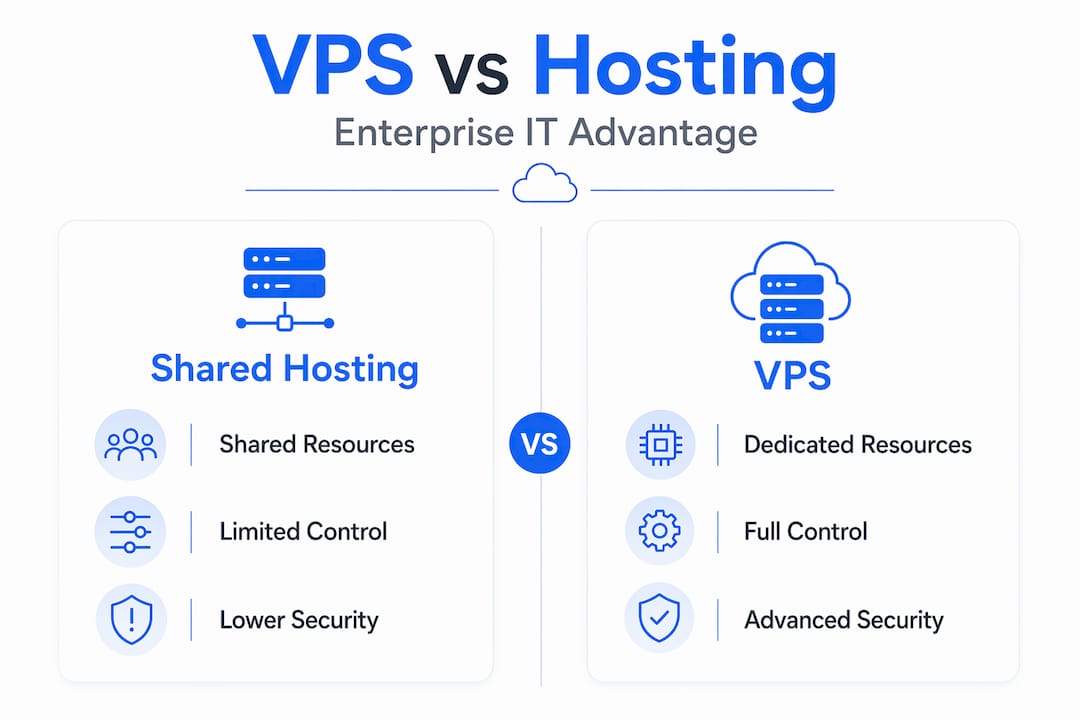
A virtual private server is a physical machine partitioned into multiple isolated environments using virtualization software. Each partition runs its own full operating system, its own file system, and its own dedicated allocation of CPU cores and RAM. Nothing bleeds across boundaries. If the tenant next door on the same physical host runs a memory-intensive batch job, your application feels nothing.
The technology that makes this possible is a hypervisor. KVM (Kernel-based Virtual Machine) is one of the most common. It sits between the hardware and the virtual machines, allocating resources and enforcing isolation. This is the technical backbone of why VPS provides predictable, stable performance in ways shared hosting structurally cannot.
Here is how VPS compares to the two most common alternatives:
| Feature | Shared hosting | VPS | Dedicated server |
|---|---|---|---|
| Resource allocation | Shared pool | Guaranteed slice | Entire machine |
| OS control | None | Full root access | Full root access |
| Performance predictability | Low | High | Highest |
| Cost range | $2-$10/month | $5-$50/month | $80-$400+/month |
| Ideal for | Personal sites | Growing businesses | High-traffic enterprise |
The core advantage for enterprise IT is that VPS fills the gap between shared hosting's affordability and dedicated hosting's power. You get full OS control, the ability to install any software, and no noisy neighbors crowding your resources. For teams running ERP systems, accounting platforms, or databases that need stable response times, that predictability is not a convenience. It is a requirement.
Pro Tip: When evaluating VPS providers, confirm the hypervisor type being used. KVM is generally preferred over OpenVZ for enterprise workloads because it provides true hardware-level isolation rather than OS-level containers.
VPS and remote access for enterprise teams
The shift to distributed and hybrid work has made remote access one of the most critical capabilities an IT infrastructure can offer. VPS is particularly well-suited to this, and understanding why requires looking at the mechanics.

When your team connects to a Windows VPS via Remote Desktop Services (RDS), they are not sending files back and forth. They are interacting with a session running entirely on the server. That means the application processing power, the data, and the software all stay centralized. A sales rep in Cork can run the same accounting software at the same speed as a developer in Dublin, both connecting to the same VPS simultaneously.
The VPS performance advantages for remote access include:
- Consistent uptime: Enterprise-grade VPS environments typically run on hardware with redundant power, networking, and storage. Home internet connections and local servers do not.
- Low latency: Latency drops from 80-120 ms to 1-10 ms when a VPS is located near critical data endpoints, which is why latency-sensitive applications like remote trading platforms are almost always VPS-hosted.
- Multi-device access: Users can connect from a laptop, tablet, or desktop without requiring local software installs.
- Centralized management: Your IT team manages one server environment instead of configuring dozens of individual workstations.
The geographic placement of your VPS matters more than most teams realize. A VPS located in the same city as your primary software provider or financial data center cuts latency to nearly zero. For applications where response time directly affects productivity or revenue, that proximity is a design decision, not an afterthought.
Pro Tip: For Irish businesses using Sage or Xero, choose a VPS provider with data centers in Ireland or the EU. The closer the server is to your accounting platform's data, the faster every transaction processes for your entire remote team.
You can see detailed performance benchmarks and deployment guidance in this VPS remote work guide built specifically for IT decision-makers.
How VPS strengthens business security
Security is where VPS most dramatically outperforms shared hosting, and it is also where the most costly mistakes happen. The distinction between isolation and shared environment is not just technical. It is a compliance boundary.
On shared hosting, dozens or hundreds of websites share the same server processes. A vulnerability in one account can expose others. On a VPS, your environment is isolated at the OS level. A compromise on another tenant's virtual machine does not touch yours. That isolation alone addresses a significant category of risk for any business handling customer data, financial records, or healthcare information under GDPR.
Here are the security hardening steps that become available to your team only when you have full OS control on a VPS:
- Change the default SSH port. Changing the default SSH port reduces automated brute-force attacks dramatically. Bots scan port 22 constantly. Moving to a non-standard port eliminates the majority of that noise.
- Configure custom firewall rules. Your team can whitelist specific IP addresses, block geographic regions, and close every port that is not actively serving a business function.
- Implement fail2ban or equivalent. Automated intrusion prevention software monitors login attempts and blocks repeat offenders.
- Set up automated daily backups with restore testing. Daily backups with restore testing are critical. A backup you have never tested is not a backup. It is an assumption.
- Use VPN access for administrative connections. Restricting server management to VPN-authenticated sessions adds another authentication layer beyond username and password.
The managed versus unmanaged distinction changes who is responsible for all of the above. With unmanaged VPS, your team owns every security configuration. With managed VPS, the provider handles OS-level patching, monitoring, and often the firewall configuration. For most businesses without a dedicated Linux server administrator on staff, unmanaged VPS is a liability dressed as a cost saving.
Pro Tip: Before signing any VPS contract, ask your provider exactly which security layers they manage and which ones fall to you. Get it in writing. "Managed" means different things to different providers.
Review the full secure hosting checklist to audit your current or prospective VPS setup against enterprise standards.
Scalability: where VPS beats its alternatives
One of the practical advantages businesses discover quickly with VPS is how scaling works. Unlike shared hosting where you have no control over resources, and unlike dedicated servers where adding capacity means buying new hardware, VPS scaling is a configuration change.
Your provider adjusts the resource allocation on your existing virtual machine. In most cases, this means:
- Upgrading from 2 vCPUs to 4 vCPUs without a server migration
- Adding RAM from 4GB to 8GB within the same billing cycle
- Expanding NVMe storage without downtime in many managed environments
An entry-level VPS starting at around $12/month with 1 core and 1GB RAM can scale with your business through incremental upgrades. That model works especially well for businesses in growth phases where predicting 12-month resource needs is nearly impossible.
The table below shows a common VPS scaling trajectory for a growing business:
| Stage | vCPUs | RAM | Storage | Monthly cost approx. |
|---|---|---|---|---|
| Launch | 1 | 2 GB | 30 GB SSD | $12-$20 |
| Growth | 2 | 4 GB | 60 GB NVMe | $25-$40 |
| Scale | 4 | 8 GB | 120 GB NVMe | $50-$80 |
| Enterprise | 8 | 16 GB | 240 GB NVMe | $80-$150 |
For IT teams evaluating VPS for small businesses, this gradual scaling model is a significant budget advantage. You are not paying for capacity you do not yet need. And because VPS avoids the complex orchestration of full cloud platforms, your team does not need DevOps expertise to manage the infrastructure as it grows. That operational simplicity often outweighs marginal cost differences when IT headcount is lean.
Real-world scenarios where this scaling model proves its value include: a professional services firm adding 15 new staff and needing more RDS user sessions, a SaaS company deploying a new module that increases database load, and an accounting practice bringing on new clients before tax season without changing anything about their hosting contract structure.
My take on VPS after years of watching businesses get this wrong
I have watched businesses make the same mistake repeatedly. They start on shared hosting, outgrow it, and then jump straight to a full cloud platform because they assume VPS is not serious enough for real workloads. That reasoning is backwards.
The predictability of fixed resource limits and full root access is exactly what most mid-sized IT teams need. Cloud platforms with elastic scaling and pay-per-millisecond billing sound appealing until your finance director sees an invoice that varies by 40% month to month. VPS gives you a fixed monthly number and no surprises.
The place I see teams fail most often is with unmanaged VPS. They choose it to save $20 a month, and then they spend 15 hours dealing with a security incident that a managed provider would have patched before it became a problem. The economics only work if you have a skilled server administrator who actually has time to stay on top of OS updates, firewall rules, and backup integrity.
What genuinely impresses me about well-run managed VPS environments is the security posture they can achieve at a price point that would be impossible with dedicated hardware. The isolation, the OS control, and the ability to deploy VPN-only administrative access create a layered defense that shared hosting cannot touch. Most organizations overlook the compliance implications of that isolation. For GDPR specifically, being able to demonstrate your customer data never touches another organization's environment is a meaningful audit point, not just a technical detail.
My honest advice: if your team cannot dedicate time to server administration, choose managed VPS. If you can, the freedom of an unmanaged environment lets you build exactly the security configuration your workloads require.
— Lukasz
Enterprise-ready Windows VPS from Netcloud24
If the concepts above describe problems your team is actively dealing with, Netcloud24 offers a direct path from evaluation to deployment.

Netcloud24's Windows VPS hosting is built specifically for business environments that need remote access, security, and scalability without the complexity of managing bare metal. Every plan includes Windows Server with RDS licensing, meaning your entire team can connect simultaneously without per-seat licensing headaches. NVMe enterprise storage, automatic backups, GDPR-compliant data handling, and firewall-protected VPN access come standard. Environments are pre-configured and ready within five minutes of deployment. Whether your team runs Sage, Xero, SQL databases, or custom ERP tools, Netcloud24's infrastructure is designed to handle those workloads reliably. You can review the full business-grade VPS features to see exactly how each specification maps to enterprise requirements.
FAQ
What is the role of a virtual private server?
A VPS provides dedicated, isolated computing resources within a shared physical server, giving businesses full OS control, predictable performance, and the ability to host applications securely without the cost of dedicated hardware.
How does VPS differ from shared hosting?
On shared hosting, all tenants share the same resources and operating environment. A VPS guarantees a fixed allocation of CPU, RAM, and storage with full OS isolation, which prevents performance degradation from other users.
Why use a virtual private server for remote access?
VPS enables low-latency, multi-user remote desktop connections that stay consistent regardless of where team members connect from. This makes it ideal for distributed teams running ERP, accounting, or database applications.
What are the security advantages of VPS over shared hosting?
VPS isolates your environment at the OS level, which means vulnerabilities on other tenants' machines do not affect yours. You also get full control to configure firewalls, harden SSH ports, and implement custom backup policies.
Is VPS suitable for small and growing businesses?
Yes. Entry-level VPS configurations are affordable and scale incrementally. Businesses can start with modest resources and upgrade CPU, RAM, and storage as workloads grow, without migrating to a new server environment.