
Technical support for VPS is defined as the ongoing service of monitoring, troubleshooting, maintaining, and securing a virtual private server to keep it operational and performing at its best. The industry term for the full-service version of this is managed VPS support, which stands in contrast to unmanaged hosting where the customer handles everything above the infrastructure layer. Understanding what VPS technical assistance actually covers, and where it stops, is the single most important thing you can do before signing a hosting contract. Providers like Krystal Hosting and platforms like Netcloud24 structure their support around two distinct models, and choosing the wrong one costs businesses real money in downtime and emergency fixes.
What is technical support for VPS?
Technical support services for a VPS go well beyond fixing things when they break. The full scope includes continuous monitoring, security hardening, cloud operations, and 24/7 incident response. This means a support team is watching your server around the clock, not waiting for you to file a ticket at 2 a.m.
The core services covered under VPS technical assistance typically include:
- 24/7 proactive monitoring and alerting: Providers monitor servers continuously and respond automatically when issues like web server failures occur. This catches problems before users notice them.
- Incident troubleshooting and resolution: When a service goes down or behaves unexpectedly, support teams diagnose the root cause and restore normal operation.
- OS and security patching: Keeping the operating system and core services current is a standard managed support task. This closes known vulnerabilities before attackers exploit them.
- Resource management: CPU, RAM, and storage allocation are monitored and adjusted to prevent bottlenecks from degrading performance.
- Backup verification: Confirming that automated backups are completing successfully and that restore points are valid.
One boundary that surprises many buyers: managed VPS covers OS patching and core services but not application-level support for software like WordPress or Joomla. If your application crashes due to a plugin conflict, that falls outside standard VPS support unless you have a separate agreement. Knowing this boundary before you sign prevents expensive gaps in coverage.
Pro Tip: Ask your provider for a written list of what is and is not covered before you commit. "Managed" means different things to different vendors, and the gap between their definition and yours is where support disputes happen.

How do managed and unmanaged VPS support differ?
This is the decision that shapes your entire server management experience. The difference is not just about price. It is about who owns the responsibility for keeping the server secure and functional.
Managed VPS hosting providers handle installation, configuration, ongoing administration, and monitoring of core services. You focus on your application and content. They handle everything underneath. Unmanaged VPS gives you full root access and hands you the keys. Every OS update, security patch, backup configuration, and firewall rule is your responsibility.
| Task | Managed VPS | Unmanaged VPS |
|---|---|---|
| OS installation and updates | Provider handles | Customer handles |
| Security patching | Provider handles | Customer handles |
| 24/7 monitoring and alerts | Included | Not included |
| Firewall configuration | Provider handles | Customer handles |
| Application support | Usually excluded | Customer handles |
| Emergency incident response | Provider responds | Customer responds |
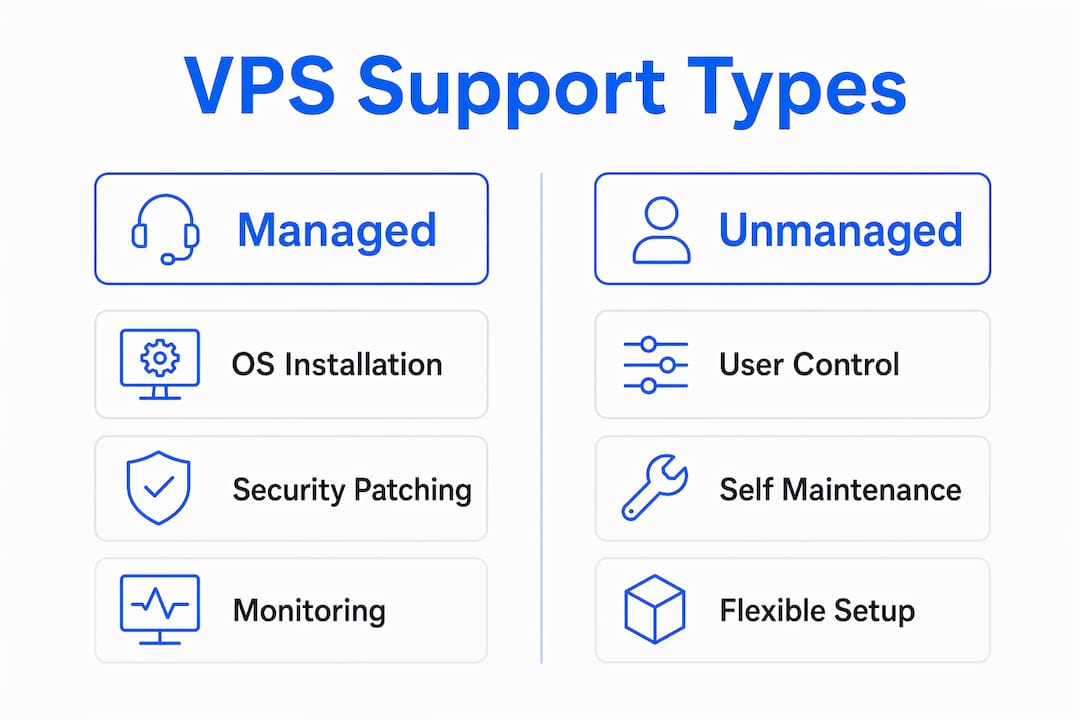
The practical implication is clear. A business running Sage accounting software or a SQL database on a Windows VPS does not want its finance team debugging kernel updates at midnight. Managed support removes that risk entirely. Unmanaged hosting makes sense for experienced system administrators who want maximum control and are comfortable with Linux or Windows Server administration at the command level.
Pro Tip: If your team does not have a dedicated sysadmin on staff, unmanaged VPS is not a cost saving. It is a liability. The first serious incident will cost more in lost productivity than a year of managed support fees.
Common VPS server problems and how support teams fix them
VPS server troubleshooting follows a predictable pattern. The same categories of problems appear repeatedly across environments, and experienced support teams work through them with structured diagnostic processes.
The most common VPS problems include SSH connection failures, misconfigured firewalls, resource bottlenecks, and service downtime. SSH issues alone account for a significant share of first-response tickets, often caused by firewall blocks, incorrect usernames, or permission mismatches on the ".ssh/authorized_keys` file.
Here is how a professional support team typically works through a VPS incident:
- Identify the symptom. Is the server unreachable, slow, or throwing specific error codes? The symptom determines the diagnostic path.
- Check system logs. Support engineers pull
/var/log/syslog, application logs, and authentication logs to find the first sign of failure. Log analysis is the fastest way to separate hardware issues from software misconfigurations. - Run performance diagnostics. Tools like
top,htop, andiostatreveal whether CPU, memory, or disk I/O is the bottleneck. Support teams use these diagnostics as standard practice in production VPS environments. - Isolate the cause. Is the problem a runaway process, a failed service, a full disk, or a network configuration error? Each requires a different fix.
- Apply the fix and verify. Restart the affected service, adjust resource limits, or roll back a recent change. Verification means confirming the fix holds under normal load, not just at the moment of resolution.
- Document and escalate if needed. If the issue points to a deeper infrastructure problem, it gets escalated to senior engineers or the data center team. Good support organizations have clear escalation paths with defined response times.
The speed of this process is what separates good VPS support from poor support. A team that takes four hours to diagnose an SSH lockout is not providing enterprise-grade service. Response time benchmarks should be part of any service level agreement you sign.
Best practices for VPS maintenance and working with support
Effective VPS server management is a shared responsibility. Even with managed support, what you do on your side of the relationship directly affects how well your server performs and how quickly problems get resolved.
- Keep your OS and software updated. Managed providers handle core OS patches, but you are responsible for the applications you install. Outdated software is the most common entry point for security incidents. The Microsoft OS Security Checklist 2026 is a practical reference for Windows Server environments.
- Configure automated backups and test them. Backups that have never been restored are not backups. Schedule regular restore tests to confirm your recovery process actually works before you need it.
- Document your server configuration. When you contact support, a clear description of your setup, recent changes, and the exact error message cuts resolution time significantly. Support teams work faster with context.
- Use a control panel where it fits your workflow. Tools like cPanel simplify routine tasks such as managing domains, databases, and email without requiring command-line access. For Windows Server environments, Remote Desktop Services and the built-in Server Manager serve the same purpose.
- Apply the principle of least privilege. Every user account and service should have only the permissions it needs. This limits the blast radius of any security incident. Pair this with a properly configured firewall and you eliminate the majority of common attack vectors.
- Understand your support boundaries. Read your service agreement carefully. Knowing whether your provider covers database-level issues or only OS-level problems prevents the frustrating experience of opening a ticket and being told it is out of scope.
Reviewing a Windows VPS security checklist before deployment is one of the most underused practices among small business owners. Most incidents are preventable with basic configuration hygiene.
How VPS technical support adds value to businesses
The business case for investing in managed VPS support comes down to a simple calculation: the cost of downtime versus the cost of support. For most businesses running revenue-generating applications, the math favors managed support by a wide margin.
"Continuous monitoring plus proactive patching reduces downtime by addressing issues before customers notice, boosting service reliability." — Krystal Hosting Knowledge Base
This is not a theoretical benefit. A business running an ERP system or accounting platform on a VPS cannot afford hours of unplanned downtime during business hours. Proactive monitoring catches a failing disk, a memory leak, or a service crash before it becomes a full outage. Reactive support alone, where you wait for something to break and then call for help, leaves you exposed to the full cost of every incident.
The secondary benefit is expertise access. Most small and mid-sized businesses do not employ a full-time Linux or Windows Server administrator. Managed VPS support gives you access to engineers who handle these environments every day. They know the common failure patterns, the right diagnostic tools, and the fastest resolution paths. That knowledge does not come cheap if you hire it in-house.
The third benefit is focus. When your server is being watched by professionals, your team focuses on the work that generates revenue. IT incidents become someone else's problem to solve. For businesses using VPS for remote desktop security and multi-user access, this reliability directly affects daily productivity across the entire organization.
Key takeaways
VPS technical support is most valuable when it combines proactive monitoring with clearly defined service boundaries, giving businesses reliable uptime without unexpected gaps in coverage.
| Point | Details |
|---|---|
| Managed vs. unmanaged support | Managed support covers OS, monitoring, and patching; unmanaged leaves all of that to the customer. |
| Support scope boundaries | Application-level issues like plugin conflicts are typically excluded from standard managed VPS support. |
| Common troubleshooting process | Support teams use log analysis, tools like htop, and structured escalation to resolve incidents fast. |
| Proactive monitoring value | Continuous monitoring catches failures before users notice, reducing downtime and its business cost. |
| Best practice for buyers | Always get a written list of what is included and excluded before signing a VPS support contract. |
Why I think most buyers underestimate the support question
After working with VPS environments across dozens of business deployments, the pattern I see most often is this: companies spend hours comparing CPU cores and storage prices, then spend about five minutes reading the support terms. That is backwards.
The hardware specs on a modern VPS are rarely the limiting factor. What determines whether your server is an asset or a liability is the quality of the support layer sitting underneath it. I have seen businesses lose an entire workday because their unmanaged VPS provider had no obligation to help with an SSH lockout. The server was technically "up." The customer just could not get into it.
The distinction between server-level and application-level support is the one that catches people off guard most often. A provider can honestly say they offer managed support while having zero obligation to touch your database configuration or your ERP installation. Confirming support boundaries before purchase is not paranoia. It is the only way to know what you are actually buying.
My honest recommendation: if your business depends on the server being available during working hours, pay for managed support and verify the SLA response times in writing. If you have a skilled sysadmin on staff who enjoys this work, unmanaged gives you more control. But for most businesses, the right answer is managed support with a provider who can clearly explain where their responsibility ends.
— Lukasz
Find VPS hosting with support built in from day one

Choosing the right VPS plan means knowing that technical support is part of the package, not an afterthought. Netcloud24 provides enterprise-grade Windows VPS hosting with 24/7 monitoring, automatic backups, firewall protection, and NVMe storage, all configured and ready within five minutes of deployment. The platform is built specifically for Irish businesses running demanding applications like Sage, Xero, SQL databases, and ERP systems that cannot afford unplanned downtime. If you need a Windows VPS with remote access and RDS licensing included, Netcloud24 delivers a fully managed environment where the support infrastructure is already in place before your first user logs in.
FAQ
What does VPS technical support include?
VPS technical support covers 24/7 server monitoring, OS and security patching, incident troubleshooting, resource management, and backup verification. Application-level support for software like WordPress or ERP systems is typically excluded unless separately contracted.
What is the difference between managed and unmanaged VPS support?
Managed VPS support means the provider handles installation, configuration, monitoring, and maintenance. Unmanaged VPS gives the customer full root access but places all software, security, and maintenance responsibilities on the customer.
What are the most common VPS server problems?
The most frequent VPS issues include SSH connection failures, misconfigured firewalls, CPU or memory bottlenecks, and service downtime. SSH problems are often caused by firewall blocks or permission errors on authentication files.
How do support teams troubleshoot a VPS issue?
Support teams start with log analysis, then run performance diagnostics using tools like htop and iostat to isolate the cause. Once identified, they apply a fix, verify it holds under load, and escalate to senior engineers if the issue points to deeper infrastructure problems.
Why is VPS technical support important for businesses?
Proactive VPS support reduces downtime by catching failures before users notice them, provides access to expert server administration, and frees business teams to focus on their core work rather than server management.