
A Windows VPS is a virtual private server running a Windows Server operating system, purpose-built to host ERP systems and other Microsoft-dependent business applications with dedicated resources and full remote desktop access. For business owners and IT managers asking why use Windows VPS for ERP, the answer comes down to three non-negotiable requirements: native software compatibility, predictable performance, and secure multi-user access. ERP platforms like Microsoft Dynamics GP, SAP Business One, and applications built on SQL Server are designed for Windows environments. Hosting them anywhere else creates friction, workarounds, and risk.
Why Windows VPS is the right fit for ERP systems
ERP software does not run in a vacuum. It depends on a tightly integrated stack of services, and Windows VPS delivers that stack out of the box. ERP systems like SAP Business One and Microsoft Dynamics GP run optimally on Windows VPS because the operating system provides native support, eliminating compatibility layers that introduce latency and instability. That matters when your finance team is posting month-end journals or your warehouse is processing hundreds of stock movements per hour.
The technical alignment goes deeper than just the OS. A Windows VPS supports the full Microsoft backend stack in one cohesive environment, including SQL Server, IIS, and ASP.NET applications alongside your ERP. This means your ERP database, web portal, and reporting services all run on the same server without cross-platform configuration headaches. For IT managers, that translates to fewer moving parts and faster troubleshooting.

Dedicated resources are the other critical factor. Unlike shared hosting, a VPS allocates fixed CPU, RAM, and storage to your environment. ERP workloads are transaction-heavy and time-sensitive. A shared environment where a neighboring tenant spikes CPU usage can cause your ERP to slow at exactly the wrong moment. A Windows VPS removes that variable entirely.
Key technical advantages that make Windows VPS the right ERP hosting platform include:
- Native OS compatibility: No emulation or compatibility layers for Windows-native ERP software
- Microsoft stack integration: SQL Server, IIS, and ASP.NET run natively without cross-platform configuration
- Dedicated resources: Fixed CPU and RAM allocations prevent performance interference from other tenants
- Multi-user access: Windows Server with RDS licensing supports concurrent user sessions for your entire team
- Remote Desktop Services (RDS): Provides a familiar Windows desktop experience for every user, regardless of their device
Pro Tip: When evaluating ERP hosting solutions, confirm that your VPS provider includes Windows Server licensing and RDS CALs in the plan. Sourcing these separately adds cost and administrative complexity.
How Windows VPS strengthens ERP security
Security is where many ERP hosting decisions go wrong. The data inside an ERP system, financial records, payroll, inventory, customer contracts, represents some of the most sensitive information a business holds. A poorly secured VPS puts all of it at risk.
The most common attack vector on a Windows VPS is Remote Desktop Protocol (RDP). Because RDP is the primary method for accessing a Windows server remotely, it attracts constant automated scanning and brute-force attempts. Hardening RDP access early is critical, and the combination of Network Level Authentication (NLA), IP whitelisting, and firewall rules forms a strong first line of defense. NLA requires users to authenticate before a full RDP session is established, which blocks a significant category of automated attacks.
A layered security approach for your Windows VPS ERP environment should follow this sequence:
- Enable Network Level Authentication (NLA) on all RDP connections to require credential verification before session establishment
- Restrict RDP access by IP address so only known office or VPN addresses can connect to the server
- Change the default RDP port from 3389 to a non-standard port to reduce automated scanning exposure
- Configure Windows Firewall rules to block all inbound traffic except explicitly permitted services
- Deploy antivirus and endpoint protection compatible with Windows Server environments
- Apply Windows updates and patches promptly to close known vulnerabilities before they are exploited
Failing to secure a Windows VPS exposes your ERP to unauthorized access, data breaches, service outages, and reputational damage. That is not a theoretical risk. Businesses running ERP on inadequately secured servers have faced regulatory penalties under GDPR for exposing personal data held within their systems.
"Combining NLA, IP whitelisting, and prompt patch management is not optional for ERP environments. These three controls address the majority of real-world attack scenarios targeting Windows servers."
For a structured approach to locking down your environment, the Windows VPS security checklist from Netcloud24 covers the full range of hardening steps specific to business hosting environments.
Windows VPS vs. other ERP hosting options
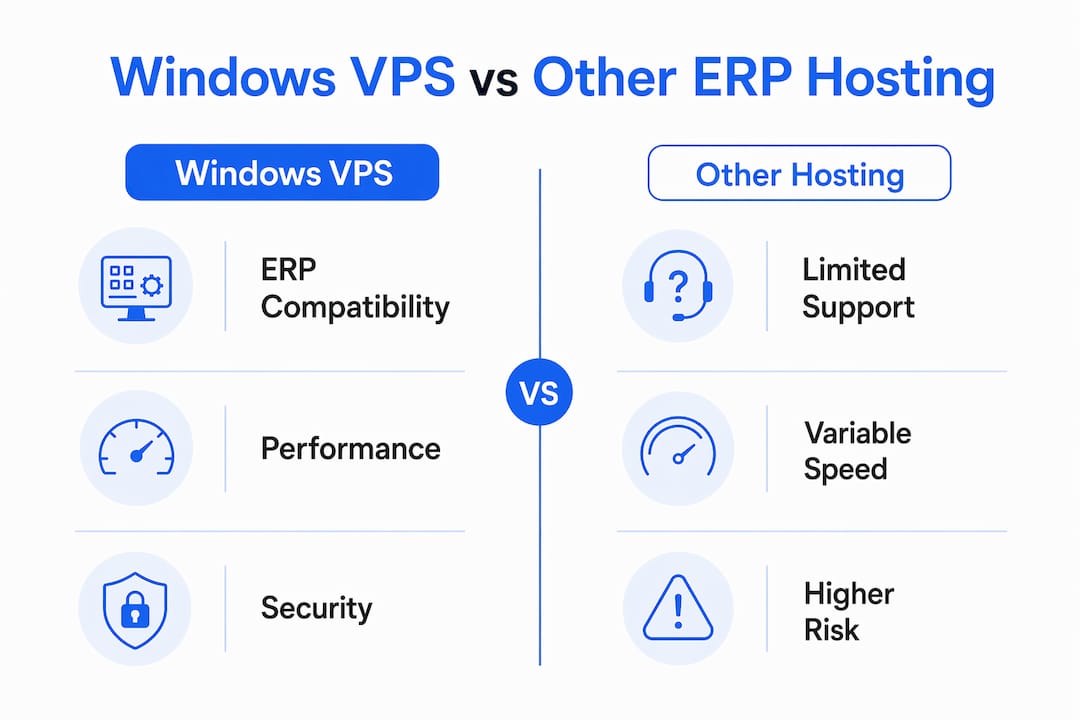
Choosing the right hosting model for ERP is a decision with long-term consequences. The table below compares Windows VPS against the three most common alternatives.
| Hosting option | ERP compatibility | Performance consistency | Remote access | Scalability |
|---|---|---|---|---|
| Windows VPS | Native for Microsoft ERP | Dedicated resources, stable | RDP with RDS licensing | Scale CPU/RAM without migration |
| Linux VPS | Requires compatibility layers for most ERP | Dedicated resources, stable | SSH or third-party tools | Flexible but requires replatforming for Windows ERP |
| Shared hosting | Not suitable for ERP workloads | Variable, affected by neighbors | Limited, no native RDP | Minimal, hard ceilings on resources |
| On-premises server | Native, full control | Excellent but hardware-dependent | Requires VPN or remote tools | Expensive, requires hardware procurement |
Linux VPS is a strong platform for many workloads, but it is the wrong choice for Microsoft-native ERP. Running Microsoft Dynamics GP or SAP Business One on Linux requires either Wine compatibility layers or virtualization workarounds, both of which introduce performance overhead and support complications. Your ERP vendor's support team will not troubleshoot a Linux-hosted Windows application.
Shared hosting is simply not a viable ERP hosting solution. ERP systems require consistent RAM allocation, database write performance, and the ability to run background services. Shared environments cannot guarantee any of these.
On-premises servers offer maximum control but carry capital expenditure, hardware refresh cycles, and the operational burden of physical maintenance. A Windows VPS delivers comparable performance with the flexibility to scale resources as your business grows, without purchasing new hardware.
Pro Tip: If your ERP vendor provides a recommended hosting specification, use it as your VPS sizing baseline. Most mid-market ERP systems require a minimum of 8GB RAM and 4 vCPUs for production workloads with five or more concurrent users.
Remote access and team collaboration on Windows VPS
One of the most practical benefits of Windows VPS for ERP is what it does for distributed teams. Every user connects to the same server environment via RDP, which means they see the same application, the same data, and the same interface regardless of whether they are in the office, working from home, or traveling.
Windows Server allows only 2 concurrent administrative RDP sessions by default. For any business with more than two ERP users, RDS licensing is required. RDS Client Access Licenses (CALs) are available per user or per device, and the right model depends on whether your staff access the server from fixed workstations or multiple devices. Getting this licensing right before go-live avoids disruption.
The practical benefits for operations and IT teams are significant:
- Centralized application management: IT managers update the ERP application once on the server, and all users immediately access the updated version
- Device-agnostic access: Staff can connect from Windows PCs, Macs, tablets, or thin clients without local software installation
- Consistent performance: Because processing happens on the server, users on lower-spec devices experience the same ERP performance as those on high-end workstations
- Simplified backup and recovery: All ERP data and configurations reside on the VPS, making backup and disaster recovery straightforward
Windows VPS centralizes ERP, business intelligence tools, web portals, and line-of-business applications in one environment, which is particularly valuable for teams spread across multiple locations. For IT managers, this means one server to monitor, one backup policy to maintain, and one security perimeter to defend. For a detailed walkthrough of configuring remote access correctly, the remote desktop setup guide from Netcloud24 covers the process step by step.
Scaling your ERP system with Windows VPS
ERP systems grow with the business. A company running five users today may have twenty in three years, along with additional modules, more data, and higher transaction volumes. The hosting platform needs to accommodate that growth without forcing a disruptive migration.
Windows VPS handles this through resource scaling. Plans allow straightforward upgrades to CPU, RAM, and storage as demand increases, and the Microsoft technology stack remains consistent throughout. You are not replatforming your ERP or retraining your IT team. You are simply allocating more resources to the same environment.
Key scaling advantages include:
- No hardware procurement: Adding capacity is a configuration change, not a purchase order
- Minimal downtime: Resource upgrades on modern VPS platforms typically require only a brief restart
- NVMe storage performance: Microsoft SQL Server on Windows VPS benefits directly from NVMe storage, which handles the read/write demands of transaction-heavy ERP databases far better than traditional SAS or SATA drives
- Backup integration: Automated backup services protect ERP data at the infrastructure level, independent of the ERP application's own backup tools
The role of VPS in enterprise IT is precisely this: providing a platform that grows with the business rather than constraining it. On-premises servers require hardware refresh cycles every three to five years. A Windows VPS sidesteps that entirely.
Key takeaways
Windows VPS is the most operationally sound ERP hosting platform for businesses running Microsoft-native software because it combines native compatibility, dedicated performance, and scalable infrastructure in one managed environment.
| Point | Details |
|---|---|
| Native ERP compatibility | Microsoft Dynamics GP, SAP Business One, and SQL Server run without compatibility workarounds on Windows VPS. |
| Security requires active hardening | NLA, IP whitelisting, firewall rules, and regular patching are non-negotiable for ERP environments. |
| RDS licensing is mandatory for teams | Windows Server allows only 2 admin RDP sessions by default; RDS CALs are required for additional users. |
| Scalability without migration | CPU, RAM, and storage upgrades happen at the infrastructure level without replatforming the ERP application. |
| Remote access centralizes management | All users connect to one server environment, simplifying updates, backups, and security monitoring. |
What I've learned from watching businesses choose ERP hosting
I have seen IT managers make the same mistake repeatedly: they evaluate ERP software thoroughly and then treat hosting as an afterthought. They pick a plan based on price, discover that RDS licensing was not included, and then spend weeks sorting out access issues after go-live. The hosting decision deserves the same rigor as the ERP selection itself.
The businesses that get this right share one characteristic. They think about the full Microsoft stack from the start. SQL Server, IIS, RDS, Windows Firewall, and the ERP application are not separate concerns. They are one system, and they perform best when hosted together on a Windows VPS configured specifically for that purpose.
My honest observation on security: most small and mid-sized businesses underestimate how aggressively RDP is targeted. Within hours of a Windows VPS going live with default settings, automated scanners will find it. NLA and IP restrictions are not advanced security measures. They are the minimum viable defense for any server holding ERP data.
The pragmatic case for Windows VPS over on-premises is also stronger than many IT managers initially expect. The capital cost of a physical server, the maintenance burden, and the inflexibility during growth phases add up quickly. A well-configured high-performance VPS delivers comparable reliability with far less operational overhead.
— Lukasz
ERP-ready Windows VPS hosting from Netcloud24

Netcloud24 offers Windows VPS hosting built specifically for ERP and Microsoft stack workloads. Plans include Windows Server 2022 and 2025, NVMe enterprise storage, Remote Desktop Services licensing, and pre-configured environments ready within five minutes. SQL Server, IIS, and ASP.NET are supported natively, and resources scale without migration as your business grows. Security is built in from the start, with firewall configuration, VPN access, and automatic backups included. For Irish businesses, Netcloud24's infrastructure meets GDPR requirements and supports local accounting integrations including Sage and Xero. Explore the Windows VPS hosting plans designed for ERP, remote access, and enterprise applications.
FAQ
What is a Windows VPS and why does it matter for ERP?
A Windows VPS is a virtual private server running Windows Server, providing dedicated resources and remote desktop access for business applications. ERP systems like Microsoft Dynamics GP and SAP Business One require a Windows environment for full compatibility and vendor support.
How many users can access an ERP system on a Windows VPS?
Windows Server allows 2 concurrent administrative RDP sessions by default. For teams with more users, RDS CAL licensing is required, available per user or per device depending on how staff connect.
Is Windows VPS more secure than shared hosting for ERP?
Windows VPS provides resource isolation and dedicated security controls that shared hosting cannot match. Hardening RDP with NLA, IP restrictions, and Windows Firewall rules gives ERP data a level of protection that shared environments structurally cannot offer.
Can I scale a Windows VPS as my ERP user count grows?
Yes. Windows VPS plans allow CPU, RAM, and storage upgrades without migrating the ERP application or changing the underlying Microsoft stack. This makes it a practical long-term ERP hosting solution for growing businesses.
Why choose Windows VPS over an on-premises server for ERP?
Windows VPS eliminates hardware procurement costs, physical maintenance, and fixed capacity ceilings. It delivers comparable performance to on-premises servers with the added benefit of managed infrastructure, automatic backups, and the ability to scale resources on demand.