Assume for a moment that your team is using basic RDP to connect employees to your company's servers. No gateway, no MFA, TCP port 3389 open to the internet. This is the single most common security mistake Irish IT managers inherit when they take over a Windows Server environment. Understanding the real role of RDS in remote access means recognizing that Microsoft's Remote Desktop Protocol is just one piece of a much larger, properly engineered platform. RDS wraps around RDP to add security, centralized management, licensing compliance, and GDPR-aligned controls that basic RDP simply cannot deliver.
Table of Contents
- Understanding Remote Desktop Services (RDS) and its core components
- Ensuring robust security and GDPR compliance with RDS in Ireland
- Navigating RDS licensing: common pitfalls and compliance traps
- Comparing RDS with alternative remote desktop solutions for Irish enterprises
- Implementing RDS effectively: practical steps and best practices for Irish IT teams
- Why mastering RDS is essential despite emerging alternatives
- Explore RDS-ready hosting solutions tailored for Irish businesses
- Frequently asked questions
Understanding Remote Desktop Services (RDS) and its core components
Basic RDP gives you a remote graphical connection to a Windows machine. That is all it does. Remote Desktop Services is the server-side platform that turns that simple connection into something you can actually deploy at enterprise scale without inviting a breach. The distinction matters enormously when you are responsible for a business where sensitive financial or ERP data sits on the other end of every remote session.
A production-ready RDS deployment requires five core role services, each with a distinct job:
- RD Session Host: The workhorse. This is the server where users actually run their applications and desktop sessions. Every user connecting to run Sage, Xero, or an ERP system is hitting an RD Session Host.
- RD Connection Broker: Manages session load balancing and reconnection. If a user drops and reconnects, the Broker sends them back to their existing session rather than starting a fresh one.
- RD Web Access: Provides the browser-based portal where users can launch RemoteApp programs or full desktops without installing a dedicated client.
- RD Gateway: The most critical component for external access. It tunnels RDP traffic over HTTPS on port 443, eliminating the need to expose the dangerous port 3389 to the internet.
- RD Licensing: Tracks and issues RDS Client Access Licenses (CALs) to users or devices. Without it, your deployment enters a 120-day grace period and then stops accepting connections entirely.
| RDS role service | Primary function | Why it matters |
|---|---|---|
| RD Session Host | Hosts user sessions and applications | Core compute for remote work |
| RD Connection Broker | Load balancing and session management | Prevents lost sessions and overload |
| RD Web Access | Browser-based application portal | Reduces client-side complexity |
| RD Gateway | HTTPS tunneling for external RDP | Closes port 3389 exposure |
| RD Licensing | CAL issuance and tracking | Legal compliance for all users |
Pro Tip: Never attempt to run all five roles on a single server in production. Separating RD Gateway and RD Session Host onto different machines limits the blast radius if either is compromised.
For more on how to use RDS efficiently once it is running, the remote desktop tips available on the NetCloud24 blog are worth reviewing before your deployment planning begins.
Ensuring robust security and GDPR compliance with RDS in Ireland
The Irish Data Protection Commission does not accept "we had a firewall" as a GDPR Article 32 compliance statement. Article 32 requires documented technical and organizational measures, and for remote access environments, that bar is specific and auditable. This is where RDS benefits for remote access become concrete rather than theoretical.

The Irish DPC mandates MFA for all remote access systems, full encryption in transit and at rest, granular access logging, and breach notifications within 72 hours. RDS supports all of these, but only if you configure it correctly.
Here is what a compliant RDS security posture looks like in practice:
- MFA integration: RDS does not include MFA natively, but it integrates with Azure AD MFA, Duo, and RADIUS-based providers through RD Gateway network policies.
- TLS 1.2+ enforcement: Disable TLS 1.0 and 1.1 at the Group Policy level and on the RD Session Host. Anything below TLS 1.2 is non-compliant with current Irish DPC guidance.
- Granular session logging: Enable Windows Event logging on the RD Session Host for logon, logoff, session duration, and application access. Forward these logs to a SIEM (Security Information and Event Management) system so they are tamper-resistant and searchable.
- Data Protection Impact Assessments (DPIAs): If your remote access system involves monitoring employee activity or processing special-category data, a DPIA is legally required before deployment.
- RD Gateway HTTPS tunneling: Configuring RD Gateway correctly means your users connect on port 443 and RDP never touches the public internet directly.
"If your organization cannot produce session logs showing exactly who accessed which data and when, you are not GDPR-compliant for remote access. The Irish DPC has made this clear in multiple enforcement actions."
Pro Tip: Document every security measure in a formal Remote Access Policy and map each control to the specific GDPR article it satisfies. This document is what your DPC auditor will ask for first.
For a step-by-step walkthrough on hardening your server environment, the guide on secure Windows Server configuration covers the specific Group Policy settings and registry changes that matter most.
Navigating RDS licensing: common pitfalls and compliance traps
Licensing is where many Irish IT managers discover an expensive problem too late. The confusion between a Base User CAL and an RDS CAL is real, and it catches organizations during software audits with consequences that range from unexpected costs to service shutdowns.
Here is the legal reality: you must have both a Base User CAL and an RDS CAL for each user or device accessing remote desktop services. The Base CAL covers general network access to the server. The RDS CAL specifically licenses the graphical desktop session. One without the other means you are non-compliant.
The most dangerous myth is that the two free simultaneous administrative RDP sessions solve the remote access problem for small teams. They do not. Those sessions are legally restricted to server management tasks like patching and configuration. Using them for daily business work is a licensing violation.
Choosing between Per User and Per Device CALs:
- Per User CAL: Best when employees use multiple devices. A traveling consultant connecting from a laptop, a tablet, and a home PC needs one Per User RDS CAL, not three Per Device CALs.
- Per Device CAL: Best when multiple employees share a single workstation, such as in shift-based manufacturing or warehouse environments.
- Assess your workforce model first. A hybrid workforce typically favors Per User CALs. Fixed-desk environments often favor Per Device.
- Track CAL consumption actively. The RD Licensing Manager console shows you real-time usage. Review it monthly, not quarterly.
- Plan for the grace period. New deployments get 120 days to install a license server. After that, sessions stop. Do not let this clock run out.
| License type | Base User CAL | RDS CAL | Admin sessions |
|---|---|---|---|
| Required for daily user access | Yes | Yes | Not applicable |
| Required for server admin only | Yes | No | 2 free concurrent |
| Covers graphical desktop session | No | Yes | N/A |
| Covers general network access | Yes | No | N/A |
Pro Tip: Before purchasing CALs, run a discovery audit to count all users and devices that will need remote access. Buying too few CALs and retrofitting is always more expensive than planning correctly the first time.
The Windows VPS licensing checklist on the NetCloud24 blog walks through this process for hosted environments where licensing is already bundled.
Comparing RDS with alternative remote desktop solutions for Irish enterprises
RDS is not the only option, and being honest about that is important. The importance of RDS in access decisions lies partly in understanding where it outperforms alternatives and where it becomes a management burden that cloud-native options handle more cleanly.
Azure Virtual Desktop (AVD) is the most direct alternative Irish enterprises consider. AVD uses a reverse connect architecture, meaning sessions are initiated outward from the Azure infrastructure rather than inward from the client. This eliminates the gateway exposure concern entirely. Microsoft manages the connection broker and gateway, and you pay per user per hour rather than managing CALs. However, data residency becomes a more complex question, and you are dependent on Microsoft's infrastructure decisions for GDPR mapping.
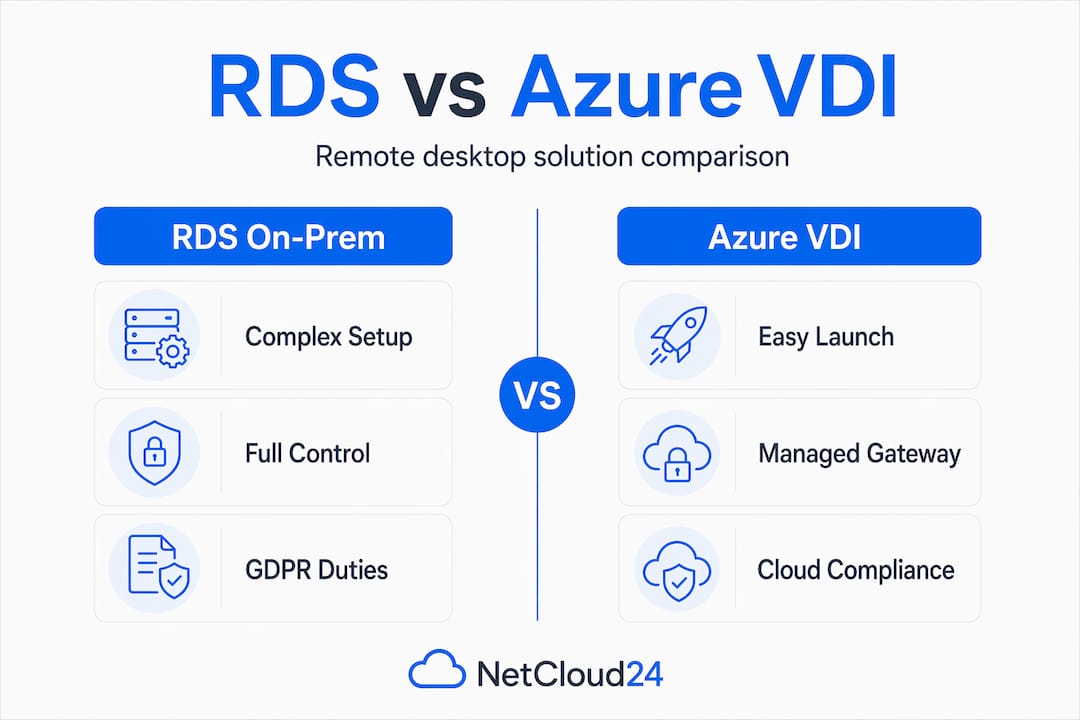
| Factor | RDS (on-premises or VPS) | Azure Virtual Desktop |
|---|---|---|
| Gateway management | Your responsibility | Managed by Microsoft |
| CAL licensing | Required and tracked manually | Replaced by per-user pricing |
| Data residency control | Full control | Region-dependent, requires audit |
| GDPR compliance burden | High, fully manual | Still requires compliance mapping |
| Setup complexity | High | Moderate |
| Cost predictability | Predictable (CALs) | Variable (usage-based) |
The key insight for Irish IT managers: RDS is powerful but complex to manage, and alternatives like Azure Virtual Desktop may simplify management while still requiring compliance mapping. Neither platform is inherently compliant. You bring the compliance expertise regardless of what you choose.
For a broader view of what else is available, the remote desktop alternatives analysis covers additional solutions worth evaluating alongside RDS.
Implementing RDS effectively: practical steps and best practices for Irish IT teams
Knowing how RDS enables remote access at a conceptual level is only half the job. Execution is where most deployments fail, usually because teams skip steps under time pressure. A complete RDS deployment includes installing all role services via Server Manager, publishing RemoteApps, configuring RD Gateway with SSL certificates, and establishing authorization policies.
Here is the practical sequence Irish IT teams should follow:
- Use Server Manager's guided "Remote Desktop Services" installation path. This deploys roles in the correct dependency order and avoids the configuration drift that happens with manual role-by-role installation.
- Publish RemoteApps selectively. Do not give users a full desktop if they only need Sage or a specific line-of-business application. Narrow the access surface.
- Bind a public SSL certificate to RD Gateway that matches your external DNS name. Self-signed certificates generate warnings that users click through, which destroys the security model.
- Create Connection Authorization Policies (CAP) to define who can connect through the Gateway (based on Active Directory group membership).
- Create Resource Authorization Policies (RAP) to define which internal servers each user group can reach through the Gateway.
- Enable TLS 1.2+ and enforce MFA at the RD Gateway level before you open any external access.
- Configure centralized session logging and forward logs to your SIEM or a tamper-resistant log archive.
- Complete your DPIA before go-live if the system processes employee activity data or sensitive personal information.
Pro Tip: Test your RD Gateway SSL configuration using an external tool that checks certificate chain validity and TLS version support before you announce the system is live. What works inside your network often fails for external users due to intermediate certificate issues.
The secure VPS setup guide goes deeper on the specific firewall rules and network configurations that complement this deployment sequence in a hosted Windows VPS environment.
Why mastering RDS is essential despite emerging alternatives
Here is an opinion that will not appear in most vendor-neutral articles: the organizations pushing hardest toward managed cloud alternatives for remote access are often doing so to avoid the discipline that RDS demands, not because the alternatives are genuinely better for their compliance posture.
Cloud alternatives do reduce administrative overhead. That is real. But they create a false sense of compliance security. Moving to AVD does not transfer your GDPR obligations. You still need to map data residency, maintain logging, enforce MFA, and document your security measures for the Irish DPC. The security must evolve beyond MFA, including patch management, penetration testing, and RBAC enforcement to meet GDPR standards. No platform solves this for you.
What mastering RDS actually teaches you is infrastructure discipline. You learn exactly where sessions are created, how credentials flow, what gets logged and what does not, and where the gaps are. That knowledge is transferable regardless of what platform you eventually use. An IT manager who has built and hardened a production RDS environment understands remote access security at a level that someone who clicked through an AVD wizard simply does not.
For Irish enterprises, the Irish DPC's growing enforcement activity makes that depth of knowledge non-negotiable. The DPC does not accept "the vendor handles compliance" as a defense. You need to demonstrate control. RDS, precisely because it demands hands-on expertise, builds that demonstrated control in a way that managed alternatives cannot replicate. The business grade VPS hosting model reflects this philosophy: give IT managers full control over their environment while handling the infrastructure layer underneath.
Explore RDS-ready hosting solutions tailored for Irish businesses
Having built a clear picture of what a compliant, secure RDS deployment requires, the next question is where to host it without spending weeks on infrastructure setup before your first user can log in.

NetCloud24 Ireland offers RDS-ready VPS hosting preconfigured with Windows Server, RDS licensing included, NVMe enterprise storage, and firewall controls aligned with GDPR requirements. Environments are live within five minutes, not five days. For IT managers under pressure to deliver remote access quickly without compromising on security or compliance, this removes the infrastructure friction while keeping you in full control of your RDS configuration, session policies, and security stack. It is built specifically for Irish enterprises running Sage, Xero, ERP platforms, and other business applications that demand dependable, low-latency remote access.
Frequently asked questions
What is the difference between RDS CALs and standard Windows Server User CALs?
RDS CALs grant remote desktop graphical session access, while User CALs cover general network access to the server. Both are required for every user or device accessing RDS in a compliant production environment.
How does RDS help achieve GDPR compliance for remote access in Ireland?
RDS supports GDPR compliance by enabling MFA through RD Gateway, enforcing encrypted connections, and providing the session logging that Irish DPC requires for breach investigation and audit readiness.
Can I use the free two admin RDP sessions for regular employee remote access?
No. The two free RDP sessions are reserved for server administration and maintenance only. Using them for daily business work violates Microsoft licensing compliance and can trigger audit penalties.
What are the biggest challenges with managing RDS compared to cloud alternatives?
RDS requires managing five distinct role services, complex CAL licensing, and full compliance documentation. Cloud alternatives simplify management but do not eliminate GDPR obligations, meaning compliance expertise is still required regardless of platform.
What best practices ensure a secure and compliant RDS deployment?
Deploy all role services correctly, secure RD Gateway with a valid public SSL certificate, implement MFA and TLS 1.2+, maintain granular session logs, complete a DPIA before go-live, and manage CAL licenses proactively to avoid service disruption after the grace period ends.
How important is granular logging under Irish DPC regulations for RDS sessions?
It is not optional. The Irish DPC imposes strict requirements for detailed access logs, and organizations that cannot prove specific data access during a breach investigation face significant penalties and enforcement action.